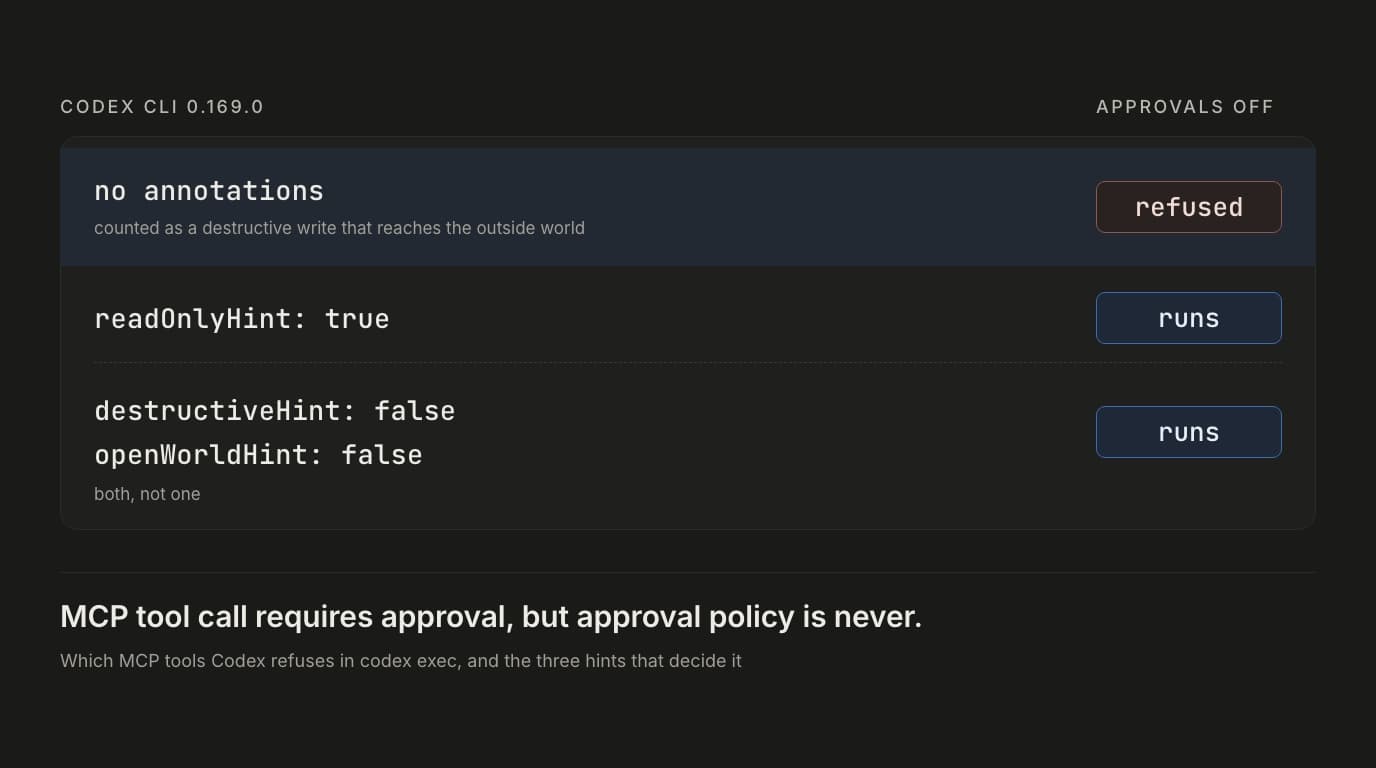
"MCP tool call requires approval, but approval policy is never" comes from Codex: the CLI, and the Codex engine inside the ChatGPT desktop app. It means Codex wants your approval before calling that MCP tool, and the session is running with approvals off, so it refuses the call instead of asking. You fix it in one of three ways: annotate the tool in the server, approve the tool in ~/.codex/config.toml, or run with automatic review.
I've hit this many times, with other people's MCP servers and my own. On November 15, 2026 I built a six-tool test server and ran it through Codex CLI 0.155.1 and 0.169.0 to find the exact rule. Everything below marked as tested comes from those runs.
The fix, if you're in a hurry
Approve the tools you've read, one at a time:
# ~/.codex/config.toml
[mcp_servers.notes.tools.create_note]
approval_mode = "approve"
Or approve every tool on a server you trust:
# ~/.codex/config.toml
[mcp_servers.notes]
command = "node"
args = ["/path/to/server.mjs"]
default_tools_approval_mode = "approve"
Replace notes and create_note with your server's and tool's names. Both are in OpenAI's MCP docs, and both worked in the test. If the server is yours, there's a better fix further down.
What the message means
Codex gives every MCP tool an approval mode. There are four: auto, prompt, writes and approve. The default is auto, where Codex reads the tool's annotations to decide whether a call needs your approval.
When a call needs approval, what happens next depends on the session:
- Approvals on: Codex asks you.
- Approvals off: nobody can be asked, so Codex refuses the call with this message.
A plain codex exec run has approvals off. Its header prints approval: never, and in the test it still printed that when I passed approval_policy = "on-request". So a script, CI job or scheduled run that uses it goes down the second path.
The exception is automatic review, which is fix 3. With --approve-for-me, the header printed approval: on-request. The source shows why: exec sets the policy to never by default, and drops that default when the session's reviewer is the automatic one.
Approvals and the sandbox are separate settings, and Claude Code vs Codex covers the defaults for both.
The refused call never leaves Codex. The test server writes a log line for each call it receives, and no refused call appeared in it. Your server's logs will show nothing, and there's nothing to debug on the server side.
Which tools Codex refuses
The test server has six tools that return a fixed string. They differ only in their annotations. These are the results in the default auto mode, in a read-only sandbox, with approvals at never:
| Tool's annotations | Codex 0.155.1 | Codex 0.169.0 |
|---|---|---|
| None | Refused | Refused |
readOnlyHint: true | Ran | Ran |
readOnlyHint: false, destructiveHint: false, openWorldHint: false | Ran | Ran |
destructiveHint: false only | Refused | Refused |
openWorldHint: false only | Refused | Refused |
readOnlyHint: true with destructiveHint: true | Refused | Ran |
The rule in 0.169.0, as it reads in Codex's source and as the test confirmed:
- A tool with
readOnlyHint: trueruns. - Any other tool runs only if it sets both
destructiveHint: falseandopenWorldHint: false.
A missing hint counts as the risky value. That matches the MCP schema, where destructiveHint and openWorldHint default to true. So a tool with no annotations, which is what most quick-start examples produce, is treated as a destructive write that reaches the outside world.
This rule belongs to auto mode. The other three modes set it aside in part or in full. Fix 2 and the list of what doesn't work show what each did in the test.
Two version notes:
- The message first appears in the 0.148.0 release (August 18, 2026). The 0.147.0 source doesn't have it. The open issue #24135, filed in May against 0.130.0, shows the older text: "user cancelled MCP tool call".
- Before 0.169.0,
destructiveHint: truewon overreadOnlyHint: true. That's the last row of the table. The order changed in PR #60638, which shipped in 0.169.0 on November 13, 2026.
Fix 1: annotate the tools, if the server is yours
Annotations fix it for anyone who runs your server in Codex's default auto mode, with no config on their side. With the official TypeScript SDK (1.32.2 in the test):
server.registerTool(
  "search_notes",
  {
    description: "Search notes by keyword.",
    inputSchema: { query: z.string() },
    annotations: { readOnlyHint: true },
  },
  async ({ query }) => ({ content: [{ type: "text", text: await searchNotes(query) }] }),
);

server.registerTool(
  "create_note",
  {
    description: "Create a note in the local notes folder.",
    inputSchema: { text: z.string() },
    annotations: { readOnlyHint: false, destructiveHint: false, openWorldHint: false },
  },
  async ({ text }) => ({ content: [{ type: "text", text: await createNote(text) }] }),
);
With the official Python SDK:
from mcp.server.mcpserver import MCPServer
# SDK 1.x has no mcpserver module. There, use this import in its place:
# from mcp.server.fastmcp import FastMCP as MCPServer
from mcp.types import ToolAnnotations

mcp = MCPServer("notes")


@mcp.tool(annotations=ToolAnnotations(readOnlyHint=True))
def search_notes(query: str) -> str:
    """Search notes by keyword."""
    return search(query)
I checked the Python version by listing the server's tools on SDK 2.3.0, and on 1.30.0 with the 1.x import. Both returned readOnlyHint: true. I didn't run the Python server under Codex.
Describe each tool as it is. The three hints answer different questions:
readOnlyHint: does the tool change anything?destructiveHint: if it changes something, can it overwrite or delete?openWorldHint: does it reach systems outside its own?
They're independent. A web search tool changes nothing and reaches the outside world, so it sets readOnlyHint: true and openWorldHint: true. In 0.169.0 that pair runs without asking in auto mode: the tool in the last row of the table sets both. A tool that deletes, overwrites or sends should say so.
Annotations aren't a consent setting. Don't leave a hint off, or set a wrong one, to make a client ask or to stop it asking. Anyone who needs a confirmation sets it on their own side: prompt mode in fix 2 needs approval on every call, whatever the hints say. Codex's source also has a strict automatic-review state, in which every MCP call goes to the reviewer and the annotation rule is skipped. I read that in the source and didn't run it.
Fix 2: approve the tool in config.toml
For a server you didn't write, approval lives in your own config. Per tool:
[mcp_servers.notes.tools.create_note]
approval_mode = "approve"
In the test, the approved tool ran and the other tools behaved as before.
For the whole server:
[mcp_servers.notes]
default_tools_approval_mode = "approve"
enabled_tools = ["search_notes", "create_note"]
All six test tools ran with default_tools_approval_mode = "approve". The enabled_tools line is optional, and worth adding: it limits the server to the tools you've read. In the test on 0.169.0, the tools left off the list weren't offered to the model at all. My own config.toml already has the server-wide line.
For a server you trust less, turn it around: make the server ask for everything, then approve tools by name.
[mcp_servers.notes]
default_tools_approval_mode = "prompt"

[mcp_servers.notes.tools.search_notes]
approval_mode = "approve"
In the test on 0.169.0, the tools approved by name ran and every other tool was refused, including the ones annotated as safe.
Two practical points:
codex mcp addhas no flag for this. I checked its help on 0.169.0. Edit the file.- For one run, pass it on the command line:
-c 'mcp_servers.notes.default_tools_approval_mode="approve"'. That's how the test set it.
Fix 3: automatic review, for unattended runs
codex exec --approve-for-me "your prompt"This turns on Codex's automatic review. Calls that need approval go to a reviewer agent, and nobody is prompted. With the flag, the run's header printed approval: on-request where a plain run prints never.
All six test tools executed this way on both versions. The event log records completed calls, not review decisions, so it doesn't show which calls the reviewer saw. OpenAI's docs say actions that already have permission run without review. By the rule above, that covers the tools that ran in the first table.
The reviewer can deny a request. The docs say Codex is then told to find a safer path, or to stop and ask. The six test tools only return a fixed string, so this test never produced a denial.
The flag also changes the sandbox. Its help text says it uses the workspace-write sandbox, and the header confirmed it. The model's shell commands can then write to the working folder, which the read-only runs above didn't allow. It can't be combined with --sandbox: 0.169.0 rejected the pair.
What doesn't fix it
All of these were tested on both versions:
- Setting
approval_policy = "on-request"on its own forcodex exec. The run still reportsapproval: never, and the same tools are refused. default_tools_approval_mode = "writes". Only the tools withreadOnlyHint: trueran.default_tools_approval_mode = "prompt". No tool ran.- One safe hint without the other.
destructiveHint: falsealone andopenWorldHint: falsealone were both refused. - Changing the sandbox. Read-only and workspace-write gave the same results.
Turning the sandbox off does make the message go away. In the source, when approvals are off and the session has full disk access, Codex approves MCP calls automatically. I didn't run that, and I wouldn't use it as the fix, because it gives up the sandbox to skip one prompt. It does explain a common puzzle: a tool that works in a full-access session and fails in a sandboxed codex exec run.
In the ChatGPT desktop app
People search for this message with "ChatGPT" in front of it. The ChatGPT desktop app carries its own codex binary. On my Mac, app version 26.1111.21308 contains one that reports 0.169.0-alpha.11.1.
I ran that binary through exec with the same test server. It refused the same three tools as the 0.169.0 CLI, and default_tools_approval_mode = "approve" made all six run. My config.toml holds the app's [desktop] settings next to the CLI's, so the fix goes in the same file. I didn't test the app's own window.
A real server: ours
Pulore's ChatGPT app is an MCP server at https://pulore.com/mcp with five tools. Four of them set readOnlyHint: true. Codex 0.169.0 called one, get_pulore_booking_link, in a codex exec run with no approval config.
The fifth, send_project_brief_to_pulore, emails us a brief. It sets readOnlyHint: false, destructiveHint: true and openWorldHint: true, because that's what it does: it sends something outside, and a sent email can't be taken back. In auto mode Codex asks before calling it, and a plain codex exec run refuses it. I didn't call it in the test, because it sends a real email.
The hints request that check. They don't enforce it. A user can approve the tool in their own config, or send approvals to automatic review, and Codex then calls it without asking a person.
OpenAI's review of ChatGPT apps checks the same three hints. Our first submission came back over them, and the review guide has what we changed.
Annotations are the server's own claims
The MCP schema calls annotations hints, and says clients shouldn't base tool decisions on annotations from servers they don't trust. In auto mode, Codex does skip approval on the server's word. A server that marks a write as readOnlyHint: true gets it through without asking.
For a server you haven't read, use the third config block above: default_tools_approval_mode = "prompt", plus approval by name for the tools you've checked.
How this was tested
- When and where: November 15, 2026, macOS 27.2.1 on Apple silicon, Node 26.12.1.
- Codex builds: CLI 0.155.1 from Homebrew, CLI 0.169.0 from npm, and the binary inside the ChatGPT desktop app.
- Re-run on November 18, 2026: Codex CLI 0.169.1 came out the day before, and its changes don't touch the approval code. Four runs on it (no approval config, approval for the server, approval for one tool, and
--approve-for-me), the two commands below and both headers gave the same results as on 0.169.0. - Server: six tools built with
@modelcontextprotocol/sdk1.32.2 over stdio. Each returns a fixed string and logs the call. - Runs: 21
codex execruns against the test server, each asking the model to call the six tools once, and one against our own server. The server and its settings were passed with-c, and my own config was left out with--ignore-user-config. The two commands below were then run as printed on both CLI versions. - Headers: the
approval:andsandbox:lines came from separate short runs with no tool calls. - Not tested: a session with the sandbox off, the interactive terminal UI, the desktop app's window, a denial by the automatic reviewer, Windows and Linux.
Run the same test
The test server, in full:
// server.mjs: six tools that return a fixed string and differ only in their annotations.
import { appendFileSync } from "node:fs";
import { McpServer } from "@modelcontextprotocol/sdk/server/mcp.js";
import { StdioServerTransport } from "@modelcontextprotocol/sdk/server/stdio.js";
import { z } from "zod";

const tools = {
  plain: undefined,
  read_only: { readOnlyHint: true },
  safe_write: { readOnlyHint: false, destructiveHint: false, openWorldHint: false },
  not_destructive: { destructiveHint: false },
  closed_world: { openWorldHint: false },
  read_only_destructive: { readOnlyHint: true, destructiveHint: true, openWorldHint: true },
};

const server = new McpServer({ name: "notes", version: "1.0.0" });
for (const [name, annotations] of Object.entries(tools)) {
  server.registerTool(
    name,
    {
      description: `Returns a fixed string for the given note id. Test tool "${name}".`,
      inputSchema: { id: z.string() },
      ...(annotations ? { annotations } : {}),
    },
    async ({ id }) => {
      // A call that reaches the server leaves a line here. A refused call leaves none.
      if (process.env.CALL_LOG) appendFileSync(process.env.CALL_LOG, `${name} ${id}\n`);
      return { content: [{ type: "text", text: `${name} ran for ${id}` }] };
    },
  );
}
await server.connect(new StdioServerTransport());
Set it up in an empty folder:
mkdir mcp-approval-test && cd mcp-approval-test
npm init -y
npm install @modelcontextprotocol/sdk@1.32.2 zod@4
Save the server as server.mjs in that folder. The next command is for this test server only, where every tool is harmless. For a real server, use the one-tool command in the section after it.
codex exec --ignore-user-config --ephemeral --skip-git-repo-check -s read-only --json \
  -c 'mcp_servers.notes.command="node"' \
  -c "mcp_servers.notes.args=[\"$PWD/server.mjs\"]" \
  -c "mcp_servers.notes.env={CALL_LOG=\"$PWD/calls.log\"}" \
  "Call each of these MCP tools from the notes server exactly once with id n1, in this order: plain, read_only, safe_write, not_destructive, closed_world, read_only_destructive. Do not run shell commands. Do not retry a tool that fails. Then print one line per tool: the tool name, then either the text it returned or the exact error text."
Each mcp_tool_call event in the output has a status and, for a refused call, the message in error. calls.log lists the calls that reached the server.
On a real server, test one read-only tool
Don't run the command above against a real server. Three reasons:
-s read-onlydoesn't make MCP tools read-only. It limits the shell commands the model runs. In the test,safe_writeran in a read-only sandbox, and the server wrote its call log to disk.--ignore-user-configleaves out your own limits. Anyenabled_tools,disabled_toolsand approval modes in your config.toml don't apply to the run.- "Call each tool" calls whatever Codex allows. By the rule above, that includes every write the server has annotated as non-destructive and closed-world.
Pick one tool you know only reads, and limit the run to it with enabled_tools:
codex exec --ignore-user-config --ephemeral --skip-git-repo-check -s read-only --json \
  -c 'mcp_servers.notes.command="node"' \
  -c 'mcp_servers.notes.args=["/path/to/server.mjs"]' \
  -c 'mcp_servers.notes.enabled_tools=["search_notes"]' \
  "Call the search_notes tool on the notes server once with the query test. Call no other tool and run no shell commands. Then print what it returned or the exact error text."
Replace notes, the path and search_notes with your own. I ran this form against the test server with read_only as the one tool: it was the only call that reached the server, on both versions.
Codex's approval rules keep moving: the read-only rule changed two days before this test. Run the test again after an upgrade.
Frequently asked questions
What does "MCP tool call requires approval, but approval policy is never" mean?
Codex decided the MCP tool needs your approval, and the session is running with approvals off, so it refused the call instead of asking. It happens in a plain codex exec run, because exec sets approvals to never unless automatic review is on, and in any other session set to never. The call never reaches the MCP server. In my test on November 15, 2026, the server's log had no entry for any refused call.
How do I allow MCP tools in codex exec?
Three ways, all tested on Codex CLI 0.155.1 and 0.169.0. Approve the tool in ~/.codex/config.toml with approval_mode = "approve" under [mcp_servers.NAME.tools.TOOL], or approve the whole server with default_tools_approval_mode = "approve". If you wrote the server, annotate each tool accurately: in the default auto mode, Codex then runs the read-only ones without asking. Or run codex exec --approve-for-me, which sends approval requests to Codex's automatic reviewer in place of a person. The reviewer can still deny a call.
Which MCP annotations stop Codex asking for approval?
In Codex CLI 0.169.0, in the default auto approval mode, a tool runs without approval if it sets readOnlyHint: true, or if it sets both destructiveHint: false and openWorldHint: false. One of those two alone isn't enough, and a tool with no annotations needs approval. Before 0.169.0, destructiveHint: true won over readOnlyHint: true. A tool or server set to prompt mode needs approval on every call, whatever its annotations say.
Is the error coming from my MCP server?
No. The text is in Codex's own source, in codex-rs/core/src/mcp_tool_call.rs, and Codex returns it before it contacts the server. Your server logs will show nothing for the refused call.
Why does the same tool work in one Codex session and fail in another?
Because the sessions have different approval settings. With approvals on, Codex asks you and the call goes ahead when you say yes. With approvals off it refuses. The exception, which I read in the source and didn't run, is a session with the sandbox off or full disk access: there Codex approves MCP calls automatically, so a tool that works in a full-access session can fail in a sandboxed codex exec run.