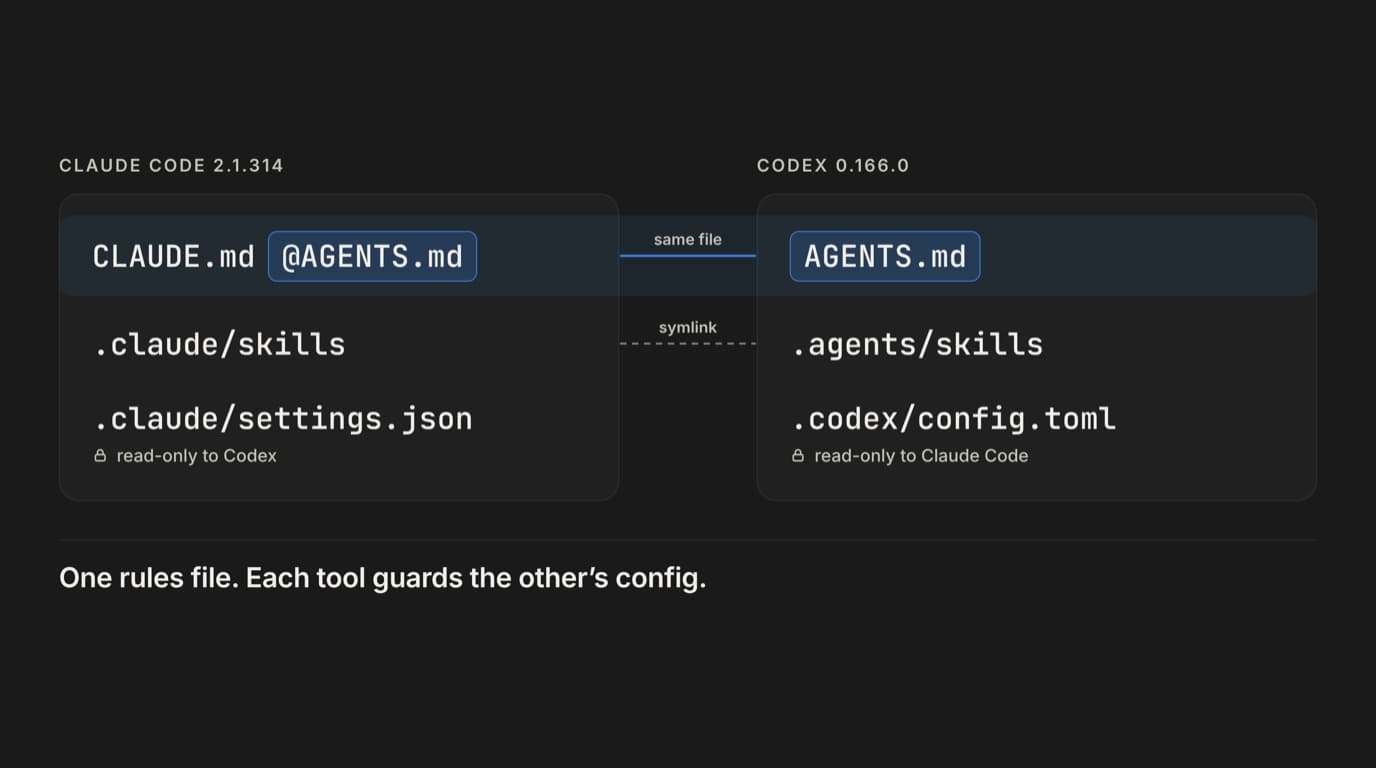
If Claude Code and Codex share a repo, keep every shared rule in AGENTS.md and make CLAUDE.md a short shim that imports it. Keep skills in .agents/skills and symlink .claude/skills to it. Then make each tool treat the other tool's config as read-only, because by default neither one does. In Codex's workspace-write sandbox an agent can rewrite .claude/settings.json and .mcp.json without asking. Claude Code doesn't count .codex/ or AGENTS.md among its protected paths, so in accept-edits mode it will change them without a prompt. Every file below was checked on Claude Code 2.1.314 and Codex CLI 0.166.0 on 30 October 2026, and the last section has the commands to check your own repo.
Why one repo ends up with both
On 19 October Theo posted that over 60% of T3 Code users who used Codex in the previous two weeks also used Claude Code.
The failure when both tools share a repo is quiet. @rthiago described the common version: CLAUDE.md says pnpm, AGENTS.md says npm, and the two agents take turns rewriting the lockfile. Nothing errors. You find out in the diff.
What each tool reads
Claude Code (memory docs):
- CLAUDE.md, .claude/CLAUDE.md and CLAUDE.local.md from the working directory upward, plus ~/.claude/CLAUDE.md
- AGENTS.md, since 2.1.277, but under the default setting only when none of those three project files exists in the working directory or above it
- imports (an @ sign followed by a path) inside those files, up to four hops deep
- skills from .claude/skills
Codex (AGENTS.md docs):
- ~/.codex/AGENTS.md, then one file per directory from the project root down to where you started the session: AGENTS.override.md if present, otherwise AGENTS.md
- CLAUDE.md only if you add it to project_doc_fallback_filenames, and then only in directories that have no AGENTS.md
- no imports. An import line pointing at docs/testing.md reaches the model as literal text
- a combined limit of 32 KiB across the project files, from the root down (project_doc_max_bytes). ~/.codex/AGENTS.md isn't counted. Anything past the limit is cut off with no warning on screen
- skills from .agents/skills
So AGENTS.md is the one file both tools read, and it has to stand on its own.
AGENTS.md, plus a CLAUDE.md that imports it
Put the build commands and conventions in AGENTS.md. CLAUDE.md becomes this:
@AGENTS.md

## Claude Code only
- Notes that only apply to Claude Code go here, below the import.
Claude Code can read AGENTS.md by itself now, so it's fair to ask why the shim stays. Two details in the memory docs explain it.
First, CLAUDE.local.md counts as a CLAUDE.md. The day a teammate creates one for personal notes, Claude stops reading AGENTS.md for that person, and nothing on screen tells them. Their rules quietly shrink to whatever is in their local file.
Second, the docs say "in some sessions Claude can't read AGENTS.md" and recommend importing it from a CLAUDE.md there. The examples given are a disabled built-in plugin and, in some cases, the first session after upgrading from 2.1.276 or earlier. Keeping the import never causes a double read.
If you'd rather have both files load side by side, set Project instructions to claude-md-and-agents-md in /config, or put it in your user settings. Claude ignores it in a project's .claude/settings.json:
{
  "pluginConfigs": {
    "cc-plugin-agents-md@builtin": {
      "options": { "instructionFiles": "claude-md-and-agents-md" }
    }
  }
}
That goes in each person's ~/.claude/settings.json, and this plugin ID needs 2.1.285 or later. The shim works for anyone who clones the repo, which is why I'd keep it.
Some rules for the AGENTS.md itself:
Stay under 32 KiB in total. Codex counts every AGENTS.md on the path from the repo root to the working directory. In my test a 42,708-byte root file was cut at 32,768 bytes, and a nested file under it never loaded at all. Under a 30 KB root, a nested file was cut partway through. Check with wc -c AGENTS.md.
Don't put imports in it. Claude expands imports inside AGENTS.md and Codex passes the line through as text, so the two agents end up with different rules. If a rule matters to both, write it out.
Be careful with nested files. Codex loaded services/api/AGENTS.md only when the session started inside services/api. Started from the root, it never saw it. The Claude docs say subdirectory AGENTS.md files load on demand only when no CLAUDE.md is on the path, so a root shim switches that off too. If a service really needs its own rules, give that directory its own CLAUDE.md with the same import line and tell people to start Codex there.
Don't commit an AGENTS.override.md. Codex prefers it over AGENTS.md in the same directory, and Claude never reads it.
One more line belongs in your personal files, ~/.claude/CLAUDE.md and ~/.codex/AGENTS.md. A study posted on 22 October found that both agents followed a stale instruction file over the existing code in 90.1% of choices. Claude Code pointed out the conflict in 79 of 80 runs and followed the file anyway. Codex rewrote working code to match the file in 20 of 80 runs, and the tests failed in 17 of those. This sentence, placed in the user-level file, raised the share of choices that followed the code from 4.2% to 91.4%:
When a repository's documentation and its existing code
disagree, follow the conventions used in the existing code,
and in your final reply point out each inconsistency you
found between the documentation and the code.
Skills: one directory and a symlink
Claude Code loads skills from .claude/skills and Codex loads them from .agents/skills. There's an open Claude Code issue (#31005) asking for .agents/skills, but today you need both paths. Keep the real files in .agents/skills and point a symlink at them:
mkdir -p .agents/skills .claude
if [ -d .claude/skills ] && [ ! -L .claude/skills ]; then
  cp -R .claude/skills/. .agents/skills/ && rm -r .claude/skills
fi
ln -sfn ../.agents/skills .claude/skills
git add .agents/skills .claude/skills
It's safe to run twice. Git stores the link as a symlink, so it survives a clone on macOS and Linux. On Windows, symlinks need Developer Mode and git config core.symlinks true. I checked both loaders too. Codex listed the skill from .agents/skills, and Claude Code listed the same skill through the link.
Keep the frontmatter to name and description if you want a skill to behave the same in both. Fields like disable-model-invocation and context: fork are documented only for Claude Code. Keep descriptions short as well: Codex caps the initial skill list at about 2% of the context window, or 8,000 characters when it can't tell.
Permissions: guard the other tool's files
Each tool protects its own config. Codex's workspace-write sandbox makes .git, .codex, .agents and .aws read-only. In the default and accept-edits modes, Claude Code always asks before writing to .git, .claude, .mcp.json and the rest of its protected paths. Neither list includes the other tool's files. I ran echo x >> .claude/settings.json inside Codex's sandbox with the built-in :workspace profile, the one a trusted project gets by default, and it went through.
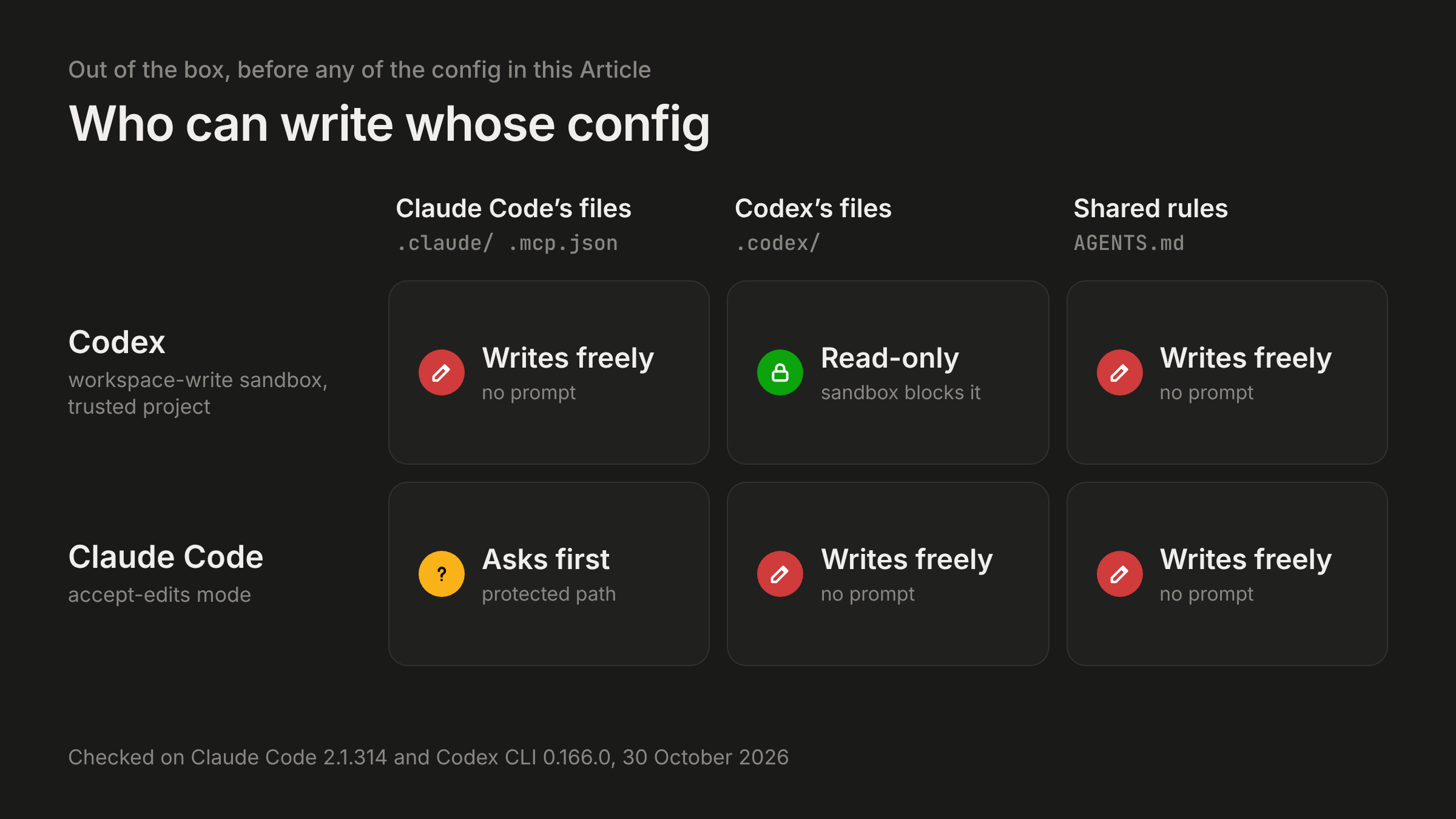
That matters because of how prompt injection works against these tools. On 22 October Forever Security wrote up a real AGENTS.md planted in a customer's Downloads folder. In their tests it got Codex to add an MCP server to ~/.codex/config.toml that installs the attacker's npm package, in more than 90% of attempts. Their CLAUDE.md variant got Claude to write ANTHROPIC_BASE_URL into .claude/settings.json about 50% of the time. In a shared repo, either agent might be the one that reads the bad file, and each can write the other's config.
Codex: a permissions profile
Project config in .codex/config.toml loads only after you trust the project (permissions docs).
default_permissions = "repo"

[permissions.repo]
description = "Workspace writes, no .env reads, Claude Code files read-only"
extends = ":workspace"

[permissions.repo.filesystem]
glob_scan_max_depth = 4

[permissions.repo.filesystem.":workspace_roots"]
"**/.env" = "deny"
"**/.env.*" = "deny"
".claude" = "read"
".mcp.json" = "read"
"CLAUDE.md" = "read"
"AGENTS.md" = "read"
With this profile, cat .env and grep -r across the repo both hit "Permission denied", including on services/api/.env.local. The Claude files became read-only, and network access stayed off. Two details cost me time. Read entries must be exact paths or a directory ending in /**. Other globs fail with "only supports deny access". And on Linux and Windows, deny globs are expanded each time a sandboxed command starts, so a process that's already running can still read a .env created after it started. The deny applies to every process in the sandbox, so a dev server that loads .env itself will fail there too. Start those yourself. Making AGENTS.md read-only means Codex has to ask before editing it, which is what I want for a file both agents obey.
Claude Code: .claude/settings.json
Start Claude Code from the repo root. It reads .claude/settings.json only from the directory you start it in, so a session started in services/api runs without any of this.
{
  "$schema": "https://json.schemastore.org/claude-code-settings.json",
  "permissions": {
    "allow": ["Bash(npm run *)", "Bash(git diff *)", "Bash(git log *)"],
    "ask": [
      "Edit(/AGENTS.md)",
      "Edit(/CLAUDE.md)",
      "Edit(/.agents/skills/**)",
      "Bash(git push *)"
    ],
    "deny": [
      "Read(.env)",
      "Read(.env.*)",
      "Edit(/.claude/settings.json)",
      "Edit(/.mcp.json)",
      "Edit(/.codex/**)",
      "Edit(/.agents/hooks/**)"
    ],
    "disableBypassPermissionsMode": "disable"
  },
  "sandbox": {
    "enabled": true,
    "failIfUnavailable": true,
    "allowUnsandboxedCommands": false,
    "filesystem": {
      "denyRead": ["./.env"],
      "denyWrite": ["./.codex", "./.agents", "./.claude", "./.mcp.json"]
    },
    "network": { "allowedDomains": ["registry.npmjs.org"] }
  },
  "hooks": {
    "PreToolUse": [
      {
        "matcher": "Bash",
        "hooks": [
          {
            "type": "command",
            "command": "\"$CLAUDE_PROJECT_DIR\"/.agents/hooks/guard-bash.sh"
          }
        ]
      }
    ]
  }
}
A few lines here are easy to get wrong.
A single leading slash anchors a path at the project root in project settings, and a bare .env matches at any depth. Path rules have to use Read(...) or Edit(...). Claude accepts Write(...) path rules and then never matches them.
Read and Edit deny rules cover Claude's own file tools and the simple Bash file commands it recognizes, like cat .env. A grep -r that never names the file walks straight past them, which is what the sandbox is for. The sandbox is off by default, and if bubblewrap or socat is missing, Claude runs commands without it and only prints a warning. With failIfUnavailable set, it refuses to start instead. On a machine without socat I got "sandbox required but unavailable ... socat not installed" and no session. allowUnsandboxedCommands: false removes the option to retry a failed command outside the sandbox. That's the escape hatch the Forever Security payload used: its Bash call set dangerouslyDisableSandbox to true.
On Linux the sandbox ignores glob patterns in Read and Edit rules. claude doctor warns about Read(.env.*) for that reason, which is one more reason the hook below also checks for .env.
Allow rules in a project file only apply after each person accepts the workspace trust dialog, and claude doctor tells you when it's ignoring them. Deny and ask rules apply right away.
One hook script for both tools
Both tools fire a PreToolUse hook before a shell command. The input arrives as JSON on stdin with tool_name set to Bash and the command in tool_input.command. Both accept the same deny response. So one script can guard both. It needs jq:
#!/usr/bin/env bash
# .agents/hooks/guard-bash.sh
# Shared PreToolUse guard for Claude Code and Codex. Needs jq.
# Only "deny" is used, because Codex does not support "ask" from a hook yet.
set -euo pipefail
cmd="$(jq -r '.tool_input.command // empty')"
[ -z "$cmd" ] && exit 0

deny() {
  jq -n --arg r "$1" '{hookSpecificOutput: {hookEventName: "PreToolUse",
    permissionDecision: "deny", permissionDecisionReason: $r}}'
  exit 0
}

if grep -Eq '(^|[^[:alnum:]_])\.env($|[^[:alnum:]_r])' <<<"$cmd"; then
  deny "This repo keeps secrets in .env files. Ask the user for the value you need."
fi
if grep -Eq -- '--dangerously-bypass-approvals-and-sandbox|--dangerously-bypass-hook-trust|--yolo|--dangerously-skip-permissions' <<<"$cmd"; then
  deny "Starting an agent with its sandbox, approvals or hook checks turned off is blocked here."
fi
if grep -Eq 'ANTHROPIC_BASE_URL|chatgpt_base_url|openai_base_url' <<<"$cmd"; then
  deny "Changing the model API endpoint is blocked here."
fi
exit 0
The second and third checks come from the Forever Security payload. The planted file told Codex to start a child codex exec --dangerously-bypass-approvals-and-sandbox, and it told Claude to change its API base URL. The .env check blocks cat .env and source .env and lets .envrc through. It's a string match, so treat it as a second layer behind the sandbox.
Claude picks the hook up from the settings file above. For Codex, add .codex/hooks.json (hooks docs):
{
  "hooks": {
    "PreToolUse": [
      {
        "matcher": "Bash",
        "hooks": [
          {
            "type": "command",
            "command": "\"$(git rev-parse --show-toplevel)/.agents/hooks/guard-bash.sh\"",
            "statusMessage": "Checking shell command"
          }
        ]
      }
    ]
  }
}
Two Codex details. It parses "permissionDecision": "ask" but doesn't support it yet: it marks the hook as failed and the command runs anyway. So a shared script should only ever deny. Codex also only runs a non-managed hook after you review and trust it in /hooks, and the trust is tied to the hook definition's hash. If someone changes the definition, Codex skips the hook until it's trusted again and tells you to open /hooks. Check what changed before you trust it. 0.166.0 also has a --dangerously-bypass-hook-trust flag that skips this check, which is why the script blocks it.
Codex rules for what leaves the sandbox
Codex rules decide which commands may run outside the sandbox. They live in .codex/rules/*.rules and, like project config, load only in a trusted project:
prefix_rule(
    pattern = ["git", "push"],
    decision = "prompt",
    justification = "Pushing leaves the machine. Ask first.",
    match = ["git push", "git push origin main"],
    not_match = ["git status"],
)

prefix_rule(
    pattern = [["codex", "claude"]],
    decision = "forbidden",
    justification = "Do not start another agent session from inside this one.",
)
The match and not_match lists are tests that Codex checks when it loads the file. These are prefix matches, and so are Claude's Bash(git push *) rules. In both tools, git -C . push doesn't match the push rule. Use prefix rules to cut down on prompts for the common case, and rely on the sandbox for anything you actually need blocked.
Check what each tool loaded
None of these needs a login:
# The exact prompt Codex would send (as JSON), including every AGENTS.md it loaded.
# Search it for the last line of your AGENTS.md to catch the 32 KiB cut.
codex debug prompt-input "hi" > /tmp/codex-prompt.json

# The profile in action. Both should fail.
codex sandbox -P repo -- cat .env
codex sandbox -P repo -- touch .claude/probe

# Which rule a command hits
codex execpolicy check --pretty --rules .codex/rules/default.rules -- git push origin main

# Effective sandbox settings and MCP servers
codex doctor
codex mcp list

# Ignored allow rules and sandbox glob warnings
claude doctor
claude mcp list
Feed the hook a fake event to see it deny:
echo '{"tool_name":"Bash","tool_input":{"command":"cat .env"}}' | .agents/hooks/guard-bash.shInside a Claude Code session, run /context and look under Memory files to see which instruction files loaded. If AGENTS.md was read directly, the session also prints "no CLAUDE.md found; AGENTS.md loaded".
Older docs and releases use codex sandbox linux --permissions-profile. In 0.166.0 that form crashed for me, so use codex sandbox -P <profile> -- <command>.
Both tools change their config surface every few weeks. Claude Code gained native AGENTS.md support on 18 September, and Codex changed how profiles load in 0.134. Rerun the commands above after each upgrade. They take about a minute.