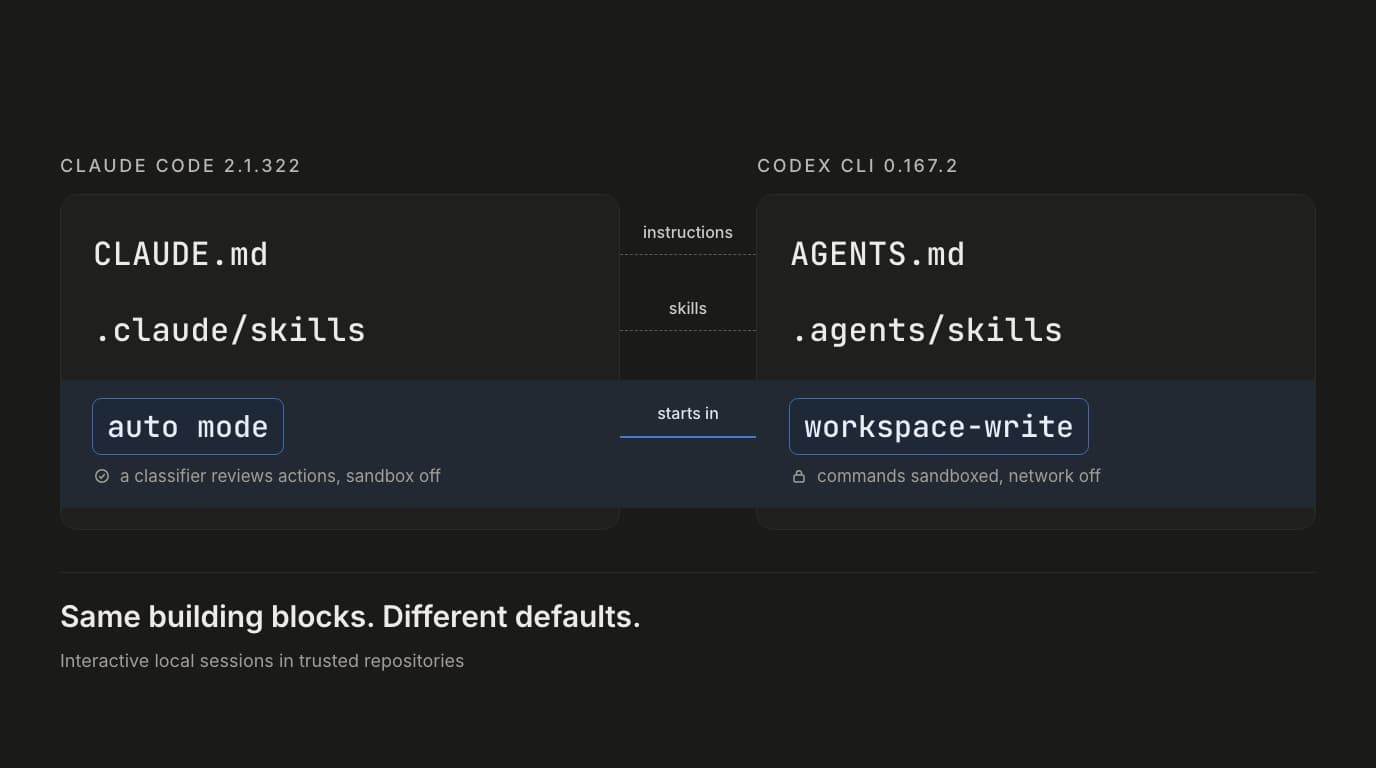
Claude Code and Codex have converged. Both read a Markdown instruction file, load skills from folders of SKILL.md files, fire a hook before every shell command, connect to MCP servers, run subagents and ship a VS Code extension. Claude Pro and ChatGPT Plus both cost $20 a month, and Codex also has limited access in the ChatGPT desktop app on the Free and Go plans. The differences that matter day to day are in the defaults. In an interactive local session in a trusted repository, Codex runs commands inside a sandbox with network access off, on macOS, Linux and native Windows. Claude Code starts in auto mode, where a classifier model reviews actions, and its sandbox stays off until you turn it on. Scripts, untrusted folders and web search are exceptions, covered under sandboxing below.
I run both in the same repo every day. Everything below comes from Anthropic's and OpenAI's docs, pricing pages, help centers and release notes, checked on November 12, 2026, when the current releases were Claude Code 2.1.322 and Codex CLI 0.167.2, plus what I tested for Claude Code and Codex in one repo. It compares documented defaults, configuration and prices. It doesn't measure code quality or how often either agent finishes a task. Prices are in US dollars, before tax.
I re-checked it on November 15 against Claude Code 2.1.325 and Codex CLI 0.169.0, both released November 13. Two changes since then touch this comparison, and both are noted below. Claude Code's sandboxed Bash commands now go through the normal permission flow by default. codex exec now keeps a project's config and MCP servers off in a folder you haven't trusted, unless you pass --trust.
The short version
| Claude Code | Codex | |
|---|---|---|
| Version on November 12 | 2.1.322, released November 10 | CLI 0.167.2, released November 11 |
| Instruction file | CLAUDE.md, with imports. AGENTS.md only if there's no CLAUDE.md | AGENTS.md, one per directory, 32 KiB in total |
| Skills folder | .claude/skills | .agents/skills |
| Interactive session, trusted repo | Starts in auto mode, with a classifier reviewing actions | Starts in the sandbox, with network access off for commands |
| Scripts: claude -p and codex exec | Starts in Manual mode | Starts in the read-only sandbox |
| Sandbox | Off by default. macOS, Linux and WSL2 | On by default. macOS, Linux, WSL2 and native Windows |
| A PreToolUse hook can | Allow, deny, ask or defer | Deny, or allow with a rewritten input |
| Runs as an MCP server | Yes, with claude mcp serve | No, that command was removed |
| Subagents | Markdown files in .claude/agents | TOML files in .codex/agents |
| Editors | VS Code and Cursor, plus a JetBrains plugin | VS Code, Cursor and Windsurf. JetBrains and Xcode build Codex in |
| Free plan | No Claude Code | Limited, in the desktop app. Also on Go at $8 a month |
| $20 a month | Claude Pro | ChatGPT Plus |
| Bigger plans | Max at $100, Ultra at $200 | Pro at $100, $200 or $500 |
Instruction files: CLAUDE.md and AGENTS.md
Claude Code reads CLAUDE.md (memory docs). It loads the managed policy file, ~/.claude/CLAUDE.md, and CLAUDE.md or .claude/CLAUDE.md in each directory from the working directory up, plus CLAUDE.local.md for personal notes. Files are concatenated from the root down, so the closest one is read last. A line with an @ sign and a path imports another file, up to four hops deep. Rules in .claude/rules can be scoped to file paths and then load only when Claude reads or edits a matching file. Since 2.1.277 Claude also reads AGENTS.md, but under the default setting only when there's no CLAUDE.md, .claude/CLAUDE.md or CLAUDE.local.md in the working directory or above it.
Codex reads AGENTS.md (AGENTS.md docs). It loads ~/.codex/AGENTS.md, then one file per directory from the project root down to the working directory, and an AGENTS.override.md wins over the AGENTS.md beside it. There's no import syntax. The project files share a 32 KiB budget, set by project_doc_max_bytes, and anything past it is cut. In my tests on earlier versions that happened with no warning on screen; Codex 0.168.0, released November 13, added a warning that names the truncated files and suggests trimming them or raising project_doc_max_bytes. CLAUDE.md is read only if you add it to project_doc_fallback_filenames.
So Claude Code has imports and path-scoped rules, and Codex has one flat file per directory and a size budget. AGENTS.md is the only file both read. That's why the shared setup keeps every common rule in AGENTS.md and makes CLAUDE.md a one-line import of it. In our study of 1,292 public repos that ship both files, 39% had no import or symlink between them, so by default each tool loaded only its own.
Codex also has an /import command that copies a Claude Code setup across (import docs). It covers instruction files, skills, plugins, MCP servers, hooks, slash commands and subagents, and maps settings.json to config.toml. Permissions aren't on the list, and the docs say to review what it brought over.
Skills
Both tools use the same format: a folder with a SKILL.md file whose frontmatter has a name and a description. The agent reads the description to decide when a skill applies, and you can also call one by name. The folders differ.
| Claude Code | Codex | |
|---|---|---|
| Project skills | .claude/skills, searched up to the repo root | .agents/skills, in every directory from the working directory up to the repo root |
| Personal skills | ~/.claude/skills | ~/.agents/skills |
| Calling one yourself | Type /skill-name | Type $ and the skill's name, or pick it from /skills |
| Stopping the model calling it | disable-model-invocation: true in the frontmatter | policy.allow_implicit_invocation: false in the skill's agents/openai.yaml |
| Extra settings | Frontmatter fields such as allowed-tools, model, context: fork and paths | UI metadata and tool dependencies in agents/openai.yaml |
Claude Code has folded custom slash commands into skills: .claude/commands/deploy.md and .claude/skills/deploy/SKILL.md both create /deploy (skills docs). Plugins bundle skills with subagents, hooks and MCP servers and install from marketplaces with /plugin. Codex keeps its starting skill list to 2% of the context window, or 8,000 characters when it can't tell the window size, and may leave skills out of a large set with a warning (skills docs).
To share skills between them, keep the files in .agents/skills and symlink .claude/skills to it. A skill that has to behave the same in both should stick to name and description.
Sandboxing and permissions
This is the biggest difference, and the one to understand before you let either tool run on its own. The defaults below are for an interactive session on your own machine, in a repository you've trusted. Three cases work differently:
- Scripts. codex exec runs in a read-only sandbox by default (non-interactive mode), and claude -p and the Agent SDK start in Manual mode.
- Folders you haven't trusted. Codex can start in read-only until you trust the folder, and it skips the project's own config, hooks and rules until then. Since CLI 0.169.0, codex exec keeps the project's config and MCP servers off there even with
--sandbox workspace-write; pass--trustto codex exec or codex review to trust the folder (release notes). Claude Code applies a project's allow rules only after you accept its trust dialog (permissions docs). - Web search and connected tools. Codex's network-off default applies to the commands it runs. It doesn't cover web search, which is on by default and reads from an OpenAI-maintained cache, or MCP servers, apps and connectors, which have their own settings (approvals and security). Claude Code's sandbox also covers shell commands only.
How the Codex sandbox works
Codex runs commands inside an operating system sandbox (sandboxing docs). There are three modes:
- read-only: reads files and can run commands, but blocks file changes. The approval policy decides which actions wait for you: with on-request, commands the sandbox allows run without asking (approvals and security).
- workspace-write: edits files in the workspace and runs routine commands there. The docs call it the default low-friction mode for local work.
- danger-full-access: no sandbox at all.
In a version-controlled folder Codex recommends workspace-write with on-request approvals, a combination it calls Auto. Outside version control it recommends read-only, and it can also start in read-only until you trust the folder (approvals and security). Commands have no network access by default. Workspace-write also keeps .git, .agents, .codex and .aws read-only, along with everything under them.
On macOS the sandbox is Seatbelt. On Linux and WSL2 it's bubblewrap plus seccomp, so install bwrap first. On native Windows, Codex uses its own Windows sandbox (Windows sandbox).
Approval policies decide what happens at the sandbox's edge. on-request asks when a command needs to go past it, never doesn't ask, and granular lets you choose which kinds of prompt stay interactive. The untrusted policy has been retired and on-failure is deprecated. --full-auto is gone too, and the docs tell scripts to pass --sandbox workspace-write instead (non-interactive mode). --approve-for-me sends approval requests to an automatic reviewer instead of you. --dangerously-bypass-approvals-and-sandbox turns off both.
Two newer layers give finer control. Permission profiles, in beta, extend a built-in profile (:read-only, :workspace or :danger-full-access) with read, write and deny rules per path (permissions docs). Rules, marked experimental, decide which commands may run outside the sandbox, and when several match, forbidden beats prompt and prompt beats allow (rules docs). Project config, hooks and rules load only once you trust the project. You can try a profile without starting a session:
codex sandbox -P <profile> -- cat .envHow Claude Code permissions work
Claude Code decides per action, and its sandbox is optional. It has six permission modes (permission modes):
| Mode | What runs without asking |
|---|---|
| default (Manual) | Reads |
| acceptEdits | Reads, file edits and common filesystem commands such as mkdir and mv |
| plan | Reads, plus commands the classifier approves when auto mode is available |
| auto | Everything, with a classifier model checking actions in the background |
| dontAsk | Reads in the working directories and pre-approved tools. Anything that would prompt is denied |
| bypassPermissions | Everything. Meant for isolated containers and VMs |
Starting Claude Code with --dangerously-skip-permissions, often called YOLO mode, is the same as --permission-mode bypassPermissions (permission modes).
Since v2.1.283, interactive sessions in the terminal and VS Code start in auto mode. Reads and edits inside the working directory go through. Everything else goes to a separate classifier model, Claude Sonnet 5 by default, which blocks actions that go beyond your request, target infrastructure it doesn't recognize or look driven by hostile content Claude has read. After 3 blocks in a row or 20 in total, the session goes back to prompting. claude -p and the Agent SDK start in Manual, and admins can turn auto mode off with permissions.disableAutoMode.
Rules sit on top of the mode: allow, ask and deny lists of patterns like Bash(npm run *) or Edit(/src/**), checked deny first, then ask, then allow (permissions docs). Allow rules don't pre-approve writes to protected paths, which include .git, .claude, .vscode, .idea, .husky, shell startup files, .npmrc and .mcp.json. Manual and acceptEdits ask first, auto mode sends them to the classifier, dontAsk denies them and bypassPermissions allows them.
The sandbox is off by default (sandboxing docs). Turn it on with /sandbox or sandbox.enabled. It covers Bash and PowerShell commands and whatever they start, not Claude's file and web tools, MCP servers or hooks. Once it's on, writes are limited to the working directory and a temp directory, reads cover most of the machine, and network traffic goes through a local proxy with an allowlist that starts empty. It uses Seatbelt on macOS and bubblewrap plus socat on Linux and WSL2. On native Windows, commands run unsandboxed. If the sandbox can't start, Claude runs commands without it unless sandbox.failIfUnavailable is true. Since 2.1.325, sandboxed Bash commands go through the normal permission flow by default. Set sandbox.autoAllowBashIfSandboxed: true to run them without prompts (changelog).
What neither one guards
Each tool protects its own config, not the other's. Codex's workspace-write sandbox lets an agent edit .claude/settings.json and .mcp.json. Claude Code's protected paths don't include .codex or AGENTS.md. In a repo with both, whichever agent reads a poisoned file can rewrite the other agent's rules. The one-repo post has the settings that make each tool's files read-only to the other.
Hooks
Both tools run a hook before a shell command, pass it the same JSON on stdin, with the command in tool_input.command, and accept the same deny response. So one script can guard both. Past that, they differ in which events they expose, what a hook can decide and what it can run.
| Claude Code (hooks docs) | Codex (hooks docs) | |
|---|---|---|
| Events | 33, from SessionStart and PreToolUse to FileChanged, WorktreeCreate and SessionEnd | 14, including PreToolUse, PermissionRequest, PostToolUse, PreModelRequest and Interrupt |
| Handler types | command, http, mcp_tool, prompt and agent, the last one experimental | command and mcp_tool. prompt and agent are parsed but skipped |
| PreToolUse decisions | allow, deny, ask or defer | deny, or allow with a rewritten input. ask is parsed but not supported: the hook is marked failed and the call goes ahead |
| Configured in | Settings files, plugins, and skill or subagent frontmatter | hooks.json or a hooks table in config.toml, at user or project level, plus plugins |
Codex also asks you to trust each hook in /hooks. Trust is tied to the hook's hash, so a changed hook is skipped until you review it again. If a guard has to work in both tools, make it a command hook on PreToolUse that only ever denies.
MCP
Both are MCP clients, with different config files.
Claude Code keeps servers at three scopes: local, the default, stored in ~/.claude.json; project, in a .mcp.json at the repo root that each person approves; and user (MCP docs). It speaks HTTP, stdio, WebSocket and the deprecated SSE, and handles OAuth through /mcp. It warns when a tool returns more than 10,000 tokens and caps output at 25,000 by default, and tool search is on by default. claude mcp serve runs Claude Code itself as an MCP server.
Codex keeps servers in mcp_servers tables in ~/.codex/config.toml, or in a trusted project's .codex/config.toml, and manages them with codex mcp add, list, login and logout (MCP docs). It speaks stdio and streamable HTTP, with bearer tokens or OAuth. It no longer runs as an MCP server. codex mcp-server has been removed, and its replacement, the app server, speaks its own JSON-RPC protocol and is marked experimental (docs).
One file can't serve both, since Claude reads JSON and Codex reads TOML. Codex's /import copies MCP servers from a Claude Code setup.
Subagents and parallel work
Claude Code subagents are Markdown files with YAML frontmatter in .claude/agents or ~/.claude/agents (subagent docs). Each can have its own tools, model, permission mode, hooks and skills, and isolation: worktree runs one in a temporary git worktree. The built-ins are Explore and Plan, which can't edit files, and general-purpose. A subagent that Claude spawns starts in the background unless you configure it otherwise. claude --worktree starts a whole session in its own worktree under .claude/worktrees. Agent teams, where several sessions work together, are experimental and off by default.
Codex subagents are on by default (subagent docs). The built-ins are default, worker and explorer. Custom agents are TOML files in .codex/agents or ~/.codex/agents, and /subagents switches between running threads. The docs point out that subagents use more tokens than a single agent. Cloud chats each get their own workspace and keep running while your computer sleeps (cloud docs). The app and CLI can also run parallel chats in git worktrees.
For scripts and CI, the non-interactive modes are claude -p and codex exec, which runs in a read-only sandbox by default. Each tool has an SDK, the Claude Agent SDK and the Codex SDK, both for TypeScript and Python, and a GitHub Action: anthropics/claude-code-action and openai/codex-action.
Editors and other places to run them
| Claude Code | Codex | |
|---|---|---|
| Terminal | macOS 13+, Windows 10 1809+, Ubuntu 20.04+, Debian 10+, Alpine 3.19+ | macOS, Linux, native Windows and WSL2 |
| VS Code and its forks | Extension for VS Code 1.94+, one-click install in Cursor, Open VSX for other forks | Extension for VS Code, Cursor, Windsurf and VS Code Insiders |
| JetBrains IDEs | Anthropic's plugin, which drives the CLI | JetBrains' own integration: choose Codex in AI Chat |
| Desktop app | The Code tab in the Claude app, on macOS, Windows and Linux (beta), paid plans | The Codex view in the ChatGPT app, on macOS and Windows, Linux in preview |
| Web and phone | claude.ai/code, and the Code tab in the iOS and Android apps | Cloud chats on the web, and the ChatGPT mobile app |
| Code review and chat | GitHub Actions, GitLab CI/CD (beta, maintained by GitLab) and Slack | @codex review on GitHub pull requests, Slack and Linear |
On October 29, 2026, Cursor removed two malicious versions of the Anthropic.claude-code extension, 2.1.312 and 2.1.313, from its extension marketplace after about 11 hours. Anthropic didn't make them, and if you installed the extension in Cursor that day, Cursor's notice explains how to check your machine.
Codex's IDE page also points to Xcode's own Codex integration. Sources: Claude Code's setup, VS Code and JetBrains pages, and Codex's CLI, IDE and app pages.
The models, for completeness: Claude Code defaults to Opus 5.5 on every paid plan and the API since 2.1.280 (model config). OpenAI's models page recommends by kind of work: Astra for the most demanding workflows, GPT-6.1 Sol for near-Astra performance at a lower cost, GPT-6.1 Terra for writing, visual understanding and computer use, and Luna for focused, repeatable tasks (models). Free and Go get GPT-6 Luna in the desktop app (pricing).
Pricing and plans
Both tools come with a chat subscription, and both run on an API key instead if you prefer to pay per token. Prices as published on November 12, 2026, in US dollars, before tax.
Claude Code
Claude Code is included in every paid Claude plan (pricing):
| Plan | Price | Usage |
|---|---|---|
| Free | $0 | No Claude Code |
| Pro | $20 a month, or $17 a month billed annually ($200) | The baseline |
| Max | $100 a month | 5 times Pro, every five hours and every week |
| Ultra | $200 a month | 10 times Pro every week, and no five-hour limit once the account is verified |
| Team, Standard seat | $25 a seat a month, or $20 billed annually | Claude Code included |
| Team, Premium seat | $125 a seat a month, or $100 billed annually | More usage than Standard |
| Enterprise | $20 a seat a month billed annually, 20 seats minimum, plus usage at API rates | Claude Code included |
Ultra is the old Max 20x plan, renamed. Existing Max 20x subscribers moved to it at the same price (help center). Usage runs in a five-hour window that starts with your first message, plus weekly limits, and both are shared across claude.ai, the desktop app and Claude Code (usage limits). Past the limits, usage credits are billed at API rates. With an API key you pay API rates from the first token: Opus 5.5 costs $4 per million input tokens and $20 per million output, and Sonnet 5.5 costs $2 and $10 (API pricing).
Codex
Codex is included in ChatGPT plans (Codex pricing):
| Plan | Price | Codex |
|---|---|---|
| Free | $0 | Limited: quick coding tasks with GPT-6 Luna in the desktop app, subject to rollout |
| Go | $8 a month | The same as Free, for lightweight coding tasks |
| Plus | $20 a month | Web, CLI, IDE extension and iOS, plus code review and Slack. An estimated 15 to 160 local messages per five hours on GPT-6.1 Sol |
| Pro | $100, $200 or $500 a month | Everything in Plus, with no five-hour limit at present. Ultrafast mode on the $500 tier |
| Business, Standard seat | $25 a user a month, or $20 billed annually, usually from 2 seats | The same estimated limits as Plus |
| Business, Premium seat | $125 a user a month, or $100 billed annually | More usage and no five-hour limit |
| Enterprise and Edu | Contact sales | Everything in Business |
Local messages and cloud chats share one allowance, and weekly limits can apply too. Paid plans can buy credits to keep going past the included usage. With an API key, Codex runs in the CLI, SDK and IDE extension at API rates, without cloud features such as GitHub code review and Slack. GPT-6.1 Sol costs $2 per million input tokens and $10 per million output for prompts up to 272,000 tokens (API pricing). The Business seat prices are on OpenAI's billing help page.
Two changes outside these tables
The tables show the plans and limits in place on November 12, 2026. Two changes sit outside them:
- OpenAI, from December. Plus, Pro and Business plans will share one usage allowance across ChatGPT and Codex, measured in tokens, and Instant chat won't draw from it (help center, read November 12, 2026). OpenAI gives no start day and no new amounts, so the Codex limits above are November's.
- Anthropic, rolling out now. Max, Ultra and Team plans include monthly API credits: $100 on Max, $200 on Ultra, and $20 per Standard or $100 per Premium Team seat, pooled up to $500 (help center, read November 12, 2026). They pay for the Claude API, Managed Agents, the Agent SDK and claude -p runs that use an API key from the linked Console organization. They don't cover interactive Claude Code in the terminal, IDE, desktop or web, or extra usage past the plan's limits, and they don't change those limits.
So the $20 plans cost the same, and only Codex has a way in below $20. Both vendors sell $100 and $200 individual plans, and both now price business seats at $25 a month for standard and $125 for premium, or $20 and $100 billed annually.
Codex vs Claude Code: when to pick which
The docs give clear reasons for each.
Pick Codex if:
- You want every command sandboxed from the start, with no network access, including on native Windows, where Claude Code runs commands unsandboxed.
- You already pay for ChatGPT. Plus includes Codex in the CLI, the IDE extension and the cloud.
- You want to try it for less than $20 a month. ChatGPT Free and Go, at $8, include limited Codex in the desktop app, and Claude's Free plan has no Claude Code.
- You want no five-hour limit for $100 a month. ChatGPT Pro has none at present, while on Claude that starts with Ultra at $200. Check again after OpenAI's December change.
Pick Claude Code if:
- You want hooks that can ask you, not only block, or that call an HTTP endpoint, a prompt or an agent instead of a script.
- You want instruction files that import other files, and rules that load when Claude touches matching files.
- You want skills that set their own allowed tools, model and context in the frontmatter.
- You want to run the agent as an MCP server inside another tool.
- You already pay for Claude.
Many teams use both. On October 19, Theo posted that over 60% of T3 Code users who used Codex in the previous two weeks also used Claude Code. The overlap makes that cheap: Claude Pro and ChatGPT Plus come to $40 a month, AGENTS.md and SKILL.md work in both, and one PreToolUse hook script can guard both. What it takes is a repo where both agents follow the same rules and neither can rewrite the other's config. That setup, with every file, is in Claude Code and Codex in one repo.
Check before you compare
Both tools ship every few days. Claude Code put out four releases between November 3 and 10, and Codex put out three between November 6 and 11. Check what you're running before you trust any comparison, this one included:
claude --version
codex --version

# What each one has loaded: settings, sandbox, MCP servers
claude doctor
codex doctor
claude mcp list
codex mcp list
Inside a Claude Code session, /context all lists the instruction files that loaded, under Memory files. For Codex, codex debug prompt-input prints the exact prompt it would send, AGENTS.md included.
Frequently asked questions
Is Claude Code better than Codex?
Neither wins across the board. This comparison covers documented defaults, configuration and prices, not code quality or how often each agent finishes a task. In an interactive session in a trusted repo, Codex runs commands in a sandbox with network access off, including on native Windows, and Claude Code starts in auto mode, where a classifier model reviews actions. Claude Code's instruction files can import other files, and its hooks can ask as well as deny. Claude Pro and ChatGPT Plus both cost $20 a month, and Codex also has limited access on ChatGPT Free and Go.
Can Claude Code and Codex share one AGENTS.md?
Yes. Codex reads AGENTS.md natively. Claude Code has read it since 2.1.277, but by default only when there's no CLAUDE.md, .claude/CLAUDE.md or CLAUDE.local.md in the working directory or above it. The setup that works for everyone is a CLAUDE.md that imports AGENTS.md in one line, as described in Claude Code and Codex in one repo.
Does Codex run in a sandbox by default?
Yes, for the commands it runs. In a version-controlled folder Codex recommends the workspace-write sandbox with on-request approvals, and outside version control it recommends read-only. It can also start in read-only until you trust the folder, and codex exec runs read-only by default. Commands have no network access by default, but web search is on, reading from an OpenAI-maintained cache, and MCP servers have their own settings. Workspace-write keeps .git, .agents, .codex and .aws read-only. The sandbox uses Seatbelt on macOS, bubblewrap on Linux and WSL2, and Codex's own sandbox on native Windows.
What are Claude Code's permission modes?
There are six: default (shown as Manual), acceptEdits, plan, auto, dontAsk and bypassPermissions. Since v2.1.283, interactive sessions in the terminal and VS Code start in auto, where a classifier model reviews everything beyond reads and edits in the working directory, unless a flag or setting picks another mode. claude -p and the Agent SDK start in Manual. Deny rules block in every mode, and allow rules never pre-approve writes to protected paths such as .git and .claude.
How much do Claude Code and Codex cost?
As of November 12, 2026, Claude Code comes with Claude Pro at $20 a month ($17 billed annually), Max at $100 and Ultra at $200. Claude's Free plan doesn't include it. Codex has limited access on ChatGPT Free and on Go at $8, and its CLI, IDE extension and cloud features start with Plus at $20 a month, then Pro at $100, $200 or $500. Standard Team and Business seats cost $25 a month on both, or $20 billed annually. From December, OpenAI will measure Plus, Pro and Business usage in tokens, shared across ChatGPT and Codex, and it hasn't published the new amounts. Max, Ultra and Team plans now include monthly API credits, which don't cover interactive Claude Code.
Can I use Claude Code or Codex with an API key instead of a subscription?
Yes, both, at API rates from the first token. Claude Opus 5.5 costs $4 per million input tokens and $20 per million output. GPT-6.1 Sol costs $2 and $10 for prompts up to 272,000 tokens. With an API key, Codex works in the CLI, SDK and IDE extension, but not the cloud features such as GitHub code review. On Claude Max, Ultra and Team, the plan's monthly API credits can pay for claude -p runs that use an API key from the linked Console organization.
Do Claude Code and Codex work in JetBrains IDEs?
Yes. Anthropic publishes a JetBrains plugin that drives the Claude Code CLI. For Codex, JetBrains builds the integration itself: you choose Codex in AI Chat.