An app built with Lovable, Bolt, Cursor, Replit or v0 can look finished within a week. The preview shows what the app does for you. It doesn't show what the app does for a stranger: whether someone who isn't signed in can read your customers' records, or whether a customer can make themselves an admin.
In February 2026, a researcher told The Register that an app for writing exam questions and viewing grades, showcased on Lovable's Discover page, had exposed 18,697 user records (The Register). He said its AI-written access check was backwards. It was meant to keep everyone but admins out of parts of the app, and instead it blocked signed-in users and let signed-out visitors through. Lovable said the project included code Lovable hadn't generated, that the database wasn't hosted by Lovable, and that the app's owner was fixing it.
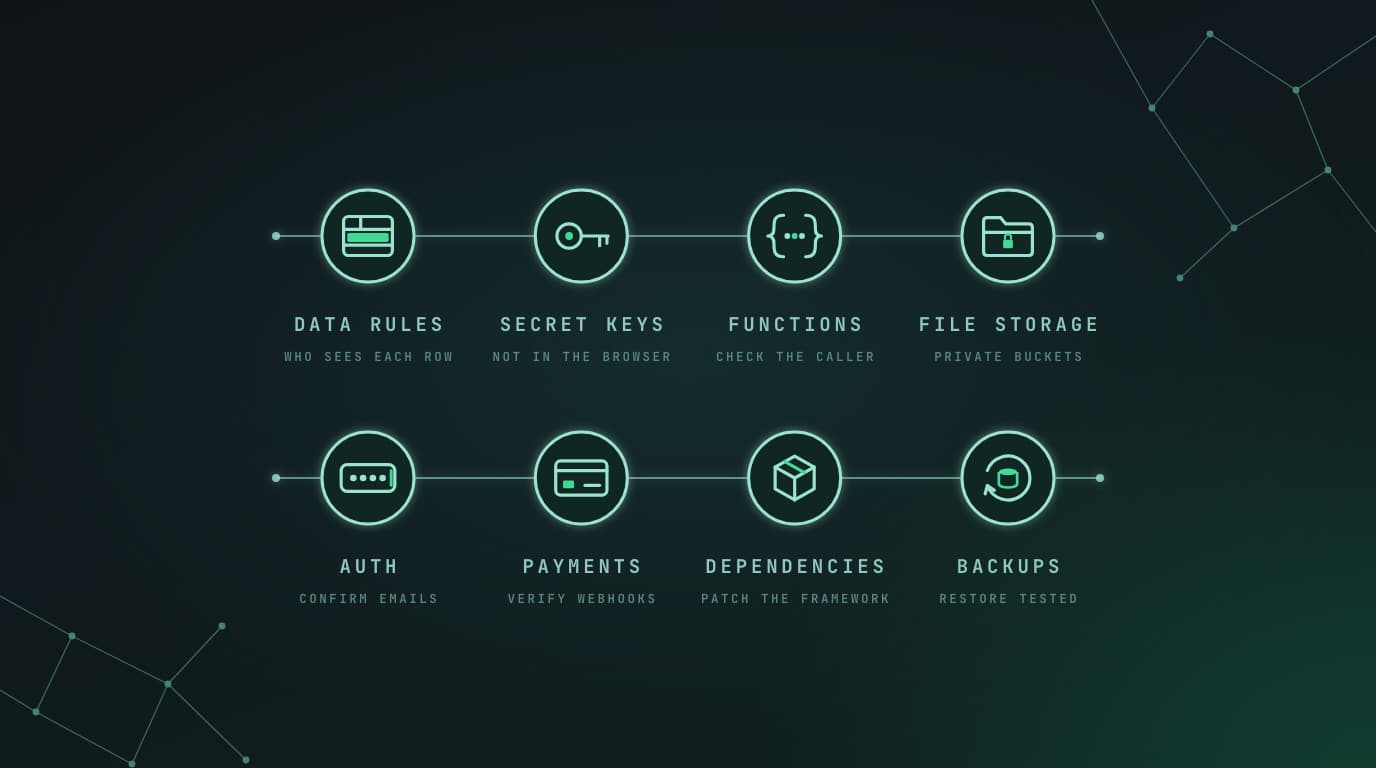
The app worked, so nothing in the preview pointed to the problem. Below are eight failure modes to check in any app built this fast. For each one: how it happens, what it looked like in a published incident or when we attacked our own demo app, and how to check yours. Most of the published evidence is about Lovable and Supabase, plus one Replit incident, so it doesn't show how often apps built with Bolt, Cursor or v0 have each problem. The checks work whatever built the app. The SQL for Supabase apps is in our Lovable security checklist, and each section names the item to use.
Our own evidence comes from Acme, a client portal for small design studios that we built with React, Vite and Supabase, in the layout Lovable generates. It's a demo app: it wasn't built in Lovable, and every person, studio and invoice in it is made up. We built most of these problems into it on purpose, then audited it for our sample report and attacked a local copy. Each of the 16 attacks worked before the fixes, was refused after them, and worked again when we reverted the fixes. The last section says exactly what we tested and what we didn't.
How common this is
Three large scans have looked for exposed data in apps like these:
| Who looked | What they looked at | What they found |
|---|---|---|
| Researchers, in the March 2025 scan behind CVE-2025-48757 | 1,645 projects from Lovable's showcase | 303 exposed endpoints in 170 projects, about 10%, leaking users, transactions, subscriptions and some API keys |
| Crissy Field, a German security firm | 159,041 Lovable projects in the Common Crawl web archive, built from December 2025 to September 2026. 34,545 of them used Supabase | 24,664 of those sent database records to visitors who weren't signed in. More read-only requests with the same public key found records with email addresses on 7,403 of them, 30% |
| UpGuard, September 23, 2026 | About 300,000 domains with signs of using Supabase, whatever built them | 16,326 databases with tables anyone could read, more than half of them with signs of personal data |
Records sent to every visitor can be meant for public display, as Crissy Field points out. It also says the 30% isn't a confirmed leak rate, since some of those addresses may be public or test data, and that its sample isn't representative. Lovable disputes the CVE, on the grounds that each customer is responsible for their own app's data. Supabase's chief information security officer told TechCrunch that its projects are secure by default and that customers control how their own projects are configured.
Both companies are right about where the responsibility sits, and that's the point. The builder gives you the tools. Whether each rule matches your business is yours to check.
The eight risks at a glance
| Risk | What goes wrong | Where we saw it | Checklist item |
|---|---|---|---|
| 1. Data rules | Rules let people read or change rows that aren't theirs | Our demo app: signed out, we read all 68 invoices | 1 to 6 |
| 2. Secret keys | A key that skips every rule ships to the browser | Our demo app: the key in its JavaScript listed all 7 accounts | 8 |
| 3. Server functions | A function answers anyone who calls it | Our demo app: signed out, we opened 60 of 60 invoices | 9 |
| 4. File storage | Files are public, listable or replaceable by other users | Our demo app: signed out, we listed 60 invoice PDFs | 7 |
| 5. Auth settings | Anyone can sign up as anyone, with a weak password | Our demo app: a made-up address with the password 123456 | 10 |
| 6. Payments and plans | Users can set their own plan, credits or payment status | CVE-2025-48757: a record marked paid without paying | 4 |
| 7. Dependencies | A known flaw in a package the app runs on | CVE-2026-102989 in TanStack Start | 9 |
| 8. Tests and backups | A fix gets undone unnoticed, and nobody has tried a restore | Our demo app: 35 of 37 access tests failed before the fixes | 11 and 13 |
1. Data rules: who can read and change each row
How this happens. In a Lovable app, and in any app where the browser reads the database directly, the database's rules are all that stands between a visitor and your data. On Supabase, grants decide whether the API's roles can use a table at all, and row level security (RLS) policies decide which rows they reach. When an app is built fast, the rule that gets written is the one that makes the feature work for whoever is testing it, and that's you, signed in. A rule that lets everyone read every invoice passes that test. So does a table with RLS off, if the API's roles have grants on it, and then anyone with your public key can read and change every row. A table without grants fails the test, and so does one with RLS on and no policies, where Postgres denies everything by default (PostgreSQL, Supabase, both read November 23, 2026). Those two are safe until a quick fix opens them: a rule that lets everyone through, or RLS turned off. UpGuard notes that Supabase turns RLS on by default for tables made in its Table Editor, but not for tables created in code, which is how coding agents create them. Where the app has its own server, the same mistake moves there: a query that doesn't filter by the signed-in user returns everyone's rows.
Supabase is tightening its defaults. Its changelog set October 30, 2026 as the date new tables in existing projects stop getting those grants automatically. Its API docs say default grants differ by project, depending on when it was created and its settings (Supabase, read November 23, 2026). Either way, existing tables keep their grants, so a table that's open stays open.
What it looked like. Every scan in the table above found this one. In our demo app, the invoices table had a policy named "Enable read access for all users", added so that clients could see their invoices. Policies combine with OR, so it opened the table to everyone: signed out, with only the public key, we read all 68 invoices from both demo studios (finding 2). The demo's messages table had RLS off and kept the API's default grants, and signed out we read all 44 messages and posted one as a studio's owner (finding 4). And any signed-in user could add themselves to any studio as its owner, then read its 30 projects (finding 5).
How to check. Items 1 to 6 of the checklist have the SQL for Supabase: tables with RLS off that the API's roles can reach, rules that let everyone through, rules that don't check the owner, columns users shouldn't be able to set, and the views and functions that skip RLS. Whatever your stack, run the two-account test from item 13. Sign in as user B and ask for user A's records by their IDs, then try again signed out. If B gets anything of A's, so can anyone who signs up.
2. Secret keys in the browser
How this happens. Some features need a secret. An admin page that lists every user needs a key that skips your rules, and a call to a paid API needs that service's key. The quickest code that works puts the key where the browser can use it. In apps built with Vite, which includes Lovable's, every variable whose name starts with VITE_ is built into the JavaScript your visitors download, and Vite's docs say those variables shouldn't hold API keys. Next.js does the same with NEXT_PUBLIC_. Keys also end up in places that feel private and aren't always: the repository, and the builder's chat.
What it looked like. In our demo app, the admin page built an admin client from VITE_SUPABASE_SERVICE_ROLE_KEY. That key sat in the built JavaScript, and with it we listed all 7 accounts and read a third-party API key that no user should see (finding 1). The same demo handed the key for its made-up PDF service to signed-out visitors through a database function (finding 9), and the 2025 scan behind CVE-2025-48757 listed an exposed function of the same kind, called get_gemini_api_key.
Code and chat aren't always private either. Lovable says that between February 3 and April 20, 2026, after a backend change re-enabled access it had removed in 2025, any Lovable user with a project's link could open the chat history and source code of public projects (Lovable). Private projects and Lovable Cloud weren't affected, and Lovable says it's contacting owners whose projects may have been viewed. Its post doesn't mention secrets. According to The Register, the researcher who reported the issue said they extracted database credentials from the source code they could read.
How to check. Item 8 of the checklist has the searches for Supabase's secret key and Stripe's live key, in your code and in every file your live site loads, which your browser's developer tools can search. Add the keys of any other service you use. Treat a secret key that was ever in the browser, the repository or a public project's code or chat as leaked: fix the cause, then rotate the key with its provider.
3. Server functions that don't check who's calling
How this happens. A function works the same whether or not it checks the caller, as long as your app is the one calling it. The missing check never shows up in the preview, and frameworks don't add it for you. Supabase's edge functions check for a valid token by default, but that check also accepts your public key, so on its own it doesn't tell you who's calling (Supabase). In Next.js, a server action can be called with a direct POST request, not only from your pages, and a sign-in check on a page doesn't cover the actions defined in it (Next.js).
What it looked like. In The Register's February case, the researcher said the backwards check was repeated across several critical functions, so a signed-out visitor could read every user record, send bulk email through the app, delete accounts and grade students' tests. In our demo app, a function that served invoice links had the token check turned off and queried with the secret key. Signed out, we opened all 60 of one demo studio's invoices by counting up through the invoice numbers (finding 8).
How to check. Item 9 of the checklist has a command that calls each edge function as a stranger would. More generally, list every function, API route and server action in your app, and for each one ask what happens when someone calls it signed out, or signed in with another user's ID. If the code doesn't make that obvious, call it and see.
4. File storage
How this happens. A public bucket is the quickest way to make a download link work. A rule that checks only the bucket's name, not whose file it is, lets every signed-in user reach every file in it. Both work in the preview.
What it looked like. Our demo app kept invoice PDFs in a public bucket. Signed out, we listed all 60 of one demo studio's PDFs and downloaded one. A signed-in user from the other studio replaced one of those PDFs, and the studio's client then downloaded the replacement from the studio's own portal (finding 3).
How to check. Item 7 of the checklist lists your buckets and their rules. Then upload a file as user A. As user B, ask for a new signed link to it and try to download it with B's session (on Supabase, createSignedUrl and download): both should be refused. Signed out, the file's public URL should fail, since only a public bucket serves one. And a signed link should stop working once it expires. Don't test by opening a link A already has, as B or signed out: a signed link is made for sharing, and works for whoever holds it until it expires (Supabase, read November 23, 2026). One link can't be revoked without deleting, moving or renaming the file, so keep expiry times short (Supabase, read November 23, 2026). Private files belong in private buckets, behind rules that check the owner.
5. Auth settings
How this happens. Email confirmation slows down testing, so it's easy to leave off while an app is built, and nothing reminds you to turn it back on. Short minimum passwords and missing rate limits don't show up in a demo either.
What it looked like. In our demo app, anyone could sign up with an address they didn't own and the password 123456, and got a session at once (finding 12). That turns every "any signed-in user" rule into "anyone".
How to check. Item 10 of the checklist covers the settings: email confirmation, leaked-password protection, password length, exact redirect URLs, rate limits and anonymous sign-ins. Then sign up with a made-up address, and see whether you get in.
6. Payments, plans and credits
How this happens. The quickest way to build a settings page is to save whatever the browser sends. If the plan, the credits or the payment status sit in a table that users can update, users can change them, because RLS decides which rows someone can update, not which columns. And a webhook handler that skips the payment provider's signature check believes anyone who says a payment went through. Stripe's docs warn that without that check, an attacker could send fake events to get orders fulfilled or access granted (Stripe).
What it looked like. The researchers behind CVE-2025-48757 inserted a record with payment_status set to paid, bypassing the app's Stripe integration (write-up). In our demo app, a studio owner moved his studio to the top plan with one request, and a client made himself an admin and went from seeing 1 client to 5, across both demo studios (finding 6). The demo has no billing webhook, so we didn't test one.
How to check. Item 4 of the checklist finds columns such as role, plan and credits that signed-in users can set. Only your payment webhook should write payment status, and it should verify the provider's signature before it writes anything. On Lovable, the Deep scan looks for prices and paid features a customer can change or reach without paying.
7. Dependencies
How this happens. A builder picks package versions when it writes the app, and they stay put until someone upgrades them. A flaw in the framework sits under every line the AI wrote. An audit can flag it, but the fix is an upgrade someone has to make and ship.
What it looked like. On September 30, 2026, TanStack published CVE-2026-102989, a critical flaw in TanStack Start, a framework Lovable apps use. A crafted link to a server function could run an attacker's JavaScript in the browser of whoever opened it. Lovable's security team found it. Lovable says not every project was affected and that it emails the owners of those that were. It added firewall rules for the apps it hosts, which get the patched version with your next change or from the project's Security page (Lovable). An app you've exported and host yourself needs @tanstack/react-start 1.168.60 or later, and a redeploy.
How to check. Run npm audit, or your package manager's equivalent, and upgrade anything with a fix, starting with the framework. On Lovable, the dependency audit reruns whenever your dependency files change and with each Quick scan. Only critical vulnerabilities become findings, and not all of those, so read the project's dependency list for the rest (Lovable's docs, read November 23, 2026).
8. No tests, and no restore you've tried
How this happens. An app built fast gets checked by clicking through the preview. Nothing reruns those checks after the next prompt, so a later change can quietly undo a fix. And backups feel handled because the platform takes them, until the day someone needs to restore one.
What it looked like. Our demo app had no tests. For the fixes, we wrote 37 database tests that act as each kind of user. 35 of them fail against the demo's original database, and all 37 pass after the fixes (finding 13). Nothing in the demo copied its 68 invoice PDFs, and Supabase's backups hold the database, not the files in storage (finding 14, Supabase).
In July 2025, The Register reported a founder's account of Replit's agent deleting his production database, despite his instruction not to change any code without permission. The agent told him a rollback wouldn't work, and it did. Replit then announced separate development and production databases for apps built on it (The Register, follow-up).
How to check. Items 11 and 13 of the checklist. Restore a backup somewhere safe and run the app against it, and keep a copy of your files outside the platform. Keep your development database apart from production, so an experiment can't touch real data. Then turn the two-account test into tests that run on every change. On Supabase, supabase test db runs them.
What scans catch, and what they miss
Run the scans. They're free and quick, and they catch real problems. Lovable's Quick scan runs every time you publish, and checks your database rules, your npm dependencies and any MCP server open without sign-in. Its dependency audit also reruns whenever your dependency files change. The Deep scan reads all of your code, for users who can reach data that isn't theirs, endpoints anyone can call, secrets in the code and payment flaws, among other things. It doesn't run on its own as you work: someone has to start it, or schedule it on an Enterprise plan. The exception is an app whose MCP integration lets people in without signing in, where publishing also starts a Deep scan (Lovable's docs, read November 23, 2026). On your own Supabase project, the Security Advisor checks the database. Here's what they can't do:
- They read, and don't attack. Lovable's docs describe its scanners as static analysis that reads code and configuration. For testing the running app, they point to AI penetration tests through Aikido, billed through Aikido (Lovable's docs, Aikido page, both read November 23, 2026).
- They can't know your rules. Three of our demo app's findings were business rules. Clients could read the names and emails of the studio's other clients (finding 10). A client the studio removed kept their projects, invoices, messages and files (finding 11). And one studio could put a project into another studio's client portal (finding 15). Neither Supabase's advisor nor our checklist's queries flagged any of them. They came from reading each policy against what the product is for.
- They see what they're built to see. On our demo app, the Security Advisor that ships with the Supabase CLI we used flagged two problems as errors: the table with RLS off and the view that skipped RLS. It checks the database, so it didn't flag the secret key in the JavaScript or the function that answered anyone. Hosted Supabase projects run a newer advisor. Lovable's scans didn't run on the demo, since it wasn't built in Lovable.
- Results go stale. A clean scan describes one version of your app, and the next prompt changes it.
Lovable says as much. Its docs say the scans "cannot guarantee complete security", and suggest a professional security review for apps that handle sensitive data or critical functions.
When to pay for a review
If you're still prototyping, with no real users, you don't need to pay anyone yet. If I had one hour with your app, I'd spend it on three checks:
- Make two test accounts, and try to read one's data as the other and again signed out (checklist item 13). For files, use the test in section 4.
- Search the JavaScript your live site loads for secret keys (item 8).
- Restore a backup somewhere safe, and open the app against it (item 11).
Then run your builder's scan, and Supabase's advisor if you're on Supabase, and fix what they find.
Pay for a review when a mistake would cost more than the review: real users' personal data, payments, health records, a raise coming up, or an enterprise customer's security questionnaire. Lovable's docs suggest the same for apps with sensitive data. What you're paying for is someone who reads the code and every rule against what your product is for, and hands you a ranked list of findings, each with its evidence and its fix.
That's our code audit: two weeks for one product, at a fixed price from $5,000 agreed in writing before we start, and usually $8,000 to $12,000 for bigger systems. I review the code, the database rules and the cloud setup, rank every risk with the effort to fix it, and walk your team through a 90-day plan. It covers apps built with Bolt, Cursor, Replit or v0 as well as Lovable. It isn't a penetration test, since we review the code and settings rather than attack your live app, and it isn't a compliance audit. The sample report shows what you get.
How we tested the demo app
- The app. Acme, a client portal for small design studios, built by us with React, Vite and Supabase in the layout Lovable generates: 9 tables, a view, 5 database functions, one storage bucket, two edge functions and the auth settings. It wasn't built in Lovable. Every person, studio and invoice in it is made up, and every email address is on example.com.
- The problems. We built in the ones our checklist covers, plus a few about tests, backups and load, then audited the app the way we audit a client's. The report has 21 ranked findings, from fix now to leave alone.
- The attacks. Run with curl on November 6, 2026, against a local copy in the Supabase CLI's local stack (CLI 2.31.4, Postgres 17.4), signed out with only the public key and signed in with real passwords as six test users. All 16 attacks worked before the fixes, were refused after them, and worked again when we reverted. Each database fix was also tested on its own. 17 checks confirmed that each kind of user could still do their job after the fixes, and all 37 database tests passed.
- What we didn't test. Anything hosted, so this wasn't a penetration test of a live system. Lovable's scans, which run only inside Lovable. A payment webhook, since the demo doesn't have one. And the demo's dependencies against a vulnerability database.
Frequently asked questions
What is vibe coding?
Building software by describing what you want to an AI tool, such as Lovable, Bolt, Replit or v0, or an AI code editor like Cursor, and letting it write the code. It's fast, and the result often works well in a demo. The security risks sit in what a demo doesn't exercise: what a stranger, or a user calling the app's API directly, can reach.
Are vibe-coded apps secure?
Some are, but nothing checks by default that an app's rules match your business. In Crissy Field's scan of Lovable apps on Supabase, 24,664 of 34,545 sent database records to visitors who weren't signed in, which can be intended. More read-only requests found records with email addresses on 7,403 of them. Crissy Field says that isn't a confirmed leak rate, since some of the addresses may be public or test data. The builders give you row level security, secret storage and scans. Whether each rule is right is yours to check.
What security risks should I check for in a vibe-coded app?
Database rules that let people read or change rows that aren't theirs, secret keys shipped to the browser, server functions that don't check who's calling, file storage that's public or open to other users, auth settings left as they were for testing, plans or payment status that users can set themselves, outdated dependencies, and no tests or tested backups. In the three large scans this post cites, the exposed data came through the first: database rules.
Can Lovable's security scan or Supabase's Security Advisor find every problem?
No. Lovable's docs say its scans find common issues but can't guarantee complete security, and suggest a professional review for apps with sensitive data. The scans read code and configuration, and the advisor checks the database. None of them can know your business rules, such as which clients each member of staff should see. On our demo app, Supabase's advisor flagged two of the problems as errors and didn't flag the secret key in the app's JavaScript.
How can I check my vibe-coded app's security myself?
Make two test accounts and try to read one's data as the other, and again signed out. For files, ask for a new download link to the other account's file, since an existing signed link works for whoever holds it until it expires. Search the JavaScript your live site loads for secret keys. Call each server function signed out. Check that email confirmation is on, and restore a backup to see that it works. Our Lovable security checklist has the SQL and the commands for Supabase apps.
How much does a security review of a vibe-coded app cost?
Ours is a fixed price from $5,000 for one app over two weeks, agreed in writing before we start, and usually $8,000 to $12,000 for bigger systems. It's a review of the code and settings, not a penetration test or a compliance audit. If you're still prototyping, start with the free checklist and your builder's own scan.