PostgreSQL 14 gets its final community release on November 12, 2026, and then the PostgreSQL project stops fixing it (versioning policy). Nothing changes on Cloud SQL that day. The bill changes on February 1, 2027, when Cloud SQL enrolls every instance still on 14 in extended support and charges for it on top of what the instance already costs (Cloud SQL versions). AlloyDB uses the same date.
At list price, extended support for a high-availability (HA) instance in London is $0.168 an hour per vCPU. For the 2 vCPU, 8 GB instance we tested, that's $245.28 a month, slightly more than the $242.80 a month its vCPUs and memory cost.
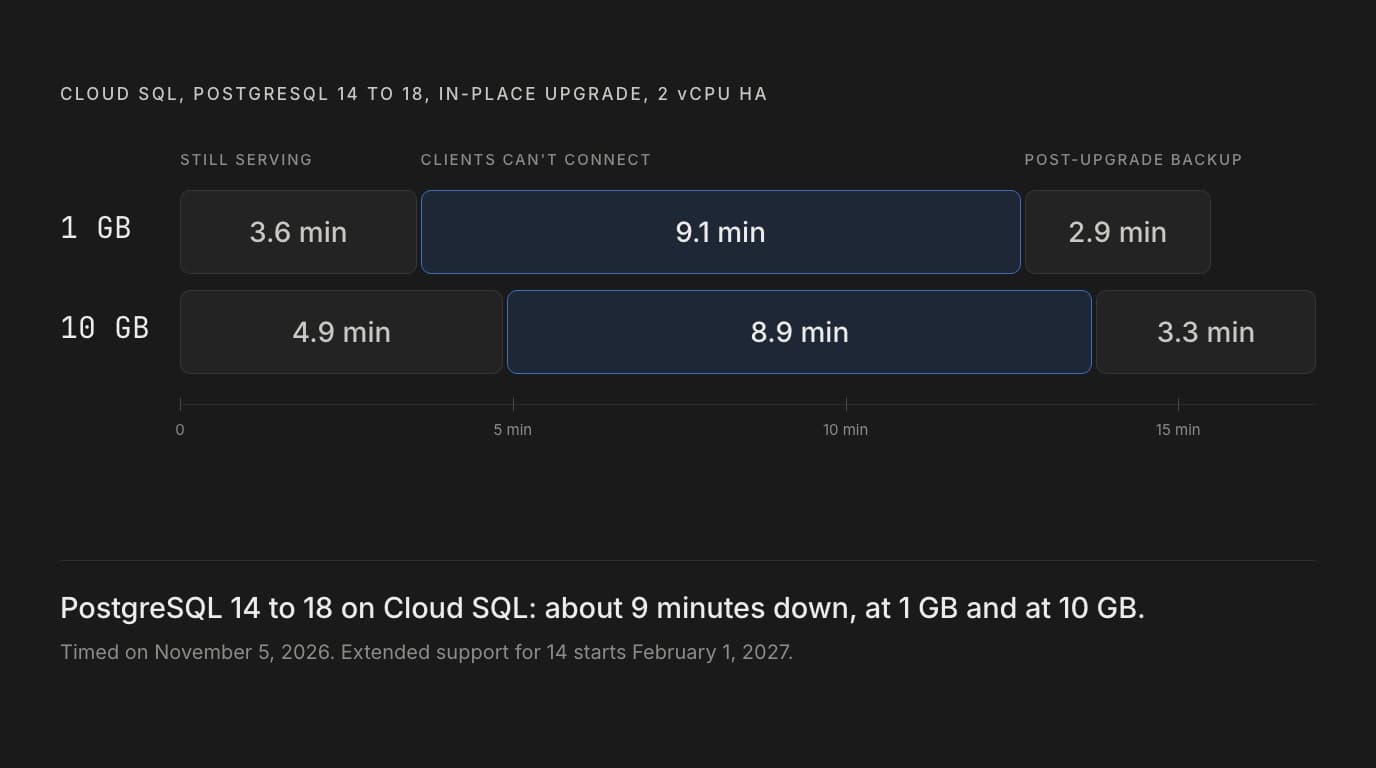
So on November 5 we upgraded two of those instances from 14 to 18 and timed everything, then ran the whole test again with a second probe inside Google Cloud. Each upgrade took 15.5 to 17 minutes as an operation. Clients couldn't connect for about nine minutes both times: 544.5 to 545.5 seconds on the instance with 1 GB of data and 516.5 to 531 seconds on the one with 10 GB, so ten times the data didn't make the outage any longer. The pre-check passed every time, and the upgrade still deleted our logical replication slot. Below are the costs, what broke and how we fixed it, the commands we ran, and how long a rollback took.
What happens when
| Date | What happens |
|---|---|
| November 12, 2026 | PostgreSQL 14's final community release. Your instances keep running as before |
| February 1, 2027 | Cloud SQL's own end of life for 14. Cloud SQL and AlloyDB enroll every PostgreSQL 14 instance in extended support and start charging for it |
| February 1, 2030 | Extended support ends after three years. Cloud SQL upgrades any instance still on 14 to the default version as part of regular maintenance, and AlloyDB upgrades its remaining clusters too |
Google's docs say notices start in the console and by email three months before enrollment. In extended support you still get patches for critical and high-severity CVEs, fixes for bugs in Cloud SQL's own code, SLA coverage, and new instances on 14 if you need them. You don't get the features and improvements Cloud SQL ships after regular support ends (extended support).
What extended support costs
Cloud SQL bills extended support per vCPU, by the second, in addition to the instance's normal price. An HA instance pays twice the rate, read replicas pay the same rate as standalone instances, committed use discounts don't apply, and the rate doubles in the third year. These are list prices from the Cloud SQL pricing page, checked on November 12, 2026:
| Per vCPU, per hour (per month) | Years 1 and 2 | Years 1 and 2, HA | Year 3 | Year 3, HA |
|---|---|---|---|---|
| us-central1 (Iowa) | $0.07 ($51.10) | $0.14 ($102.20) | $0.14 ($102.20) | $0.28 ($204.40) |
| europe-west2 (London) | $0.084 ($61.32) | $0.168 ($122.64) | $0.168 ($122.64) | $0.336 ($245.28) |
The monthly figures are Google's, at 730 hours. Across all regions, the rate for years 1 and 2 without HA runs from $0.07 to $0.112 an hour per vCPU. Shared-core instances, db-f1-micro and db-g1-small, are charged per instance instead.
What that adds in years 1 and 2:
- The instance we tested, 2 vCPUs with HA in London: $245.28 a month, against $242.80 for its vCPUs and memory. In year 3, $490.56.
- 4 vCPUs with HA in Iowa: $408.80 a month, or $4,905.60 a year.
- 8 vCPUs with HA in London, plus an 8 vCPU read replica: $981.12 for the primary and $490.56 for the replica, so $1,471.68 a month, or $17,660.16 a year.
AlloyDB also charges per vCPU: $0.07 an hour in us-central1 and $0.08 in europe-west2 in years 1 and 2, and $0.14 and $0.16 in year 3. An HA cluster pays for its standby as well as the primary, and read pool instances pay the same rate (AlloyDB pricing).
Paying buys time, not a way out. After three years of extended support, Cloud SQL upgrades the instance itself, as part of regular maintenance.
How long the upgrade takes
We created two Cloud SQL Enterprise instances on PostgreSQL 14.24, each a db-custom-2-8192 (2 vCPUs, 8 GB) with HA, in europe-west2. Both got the same Supabase-shaped schema, with about 1 GB of data in one and 10 GB in the other. Then we upgraded each to 18 with gcloud while a probe on a laptop opened a new connection and wrote a row every half second. We ran the whole test twice, on new instances. The second time, to rule out our own network, we added the same probe on a VM in the primary's zone and read Cloud SQL's logs. The laptop and the VM measured the same outage to the tenth of a second, and the server's logs agreed within 0.2 seconds. The full setup is at the end of this post.
| 1 GB, first run | 1 GB, second run | 10 GB, first run | 10 GB, second run | |
|---|---|---|---|---|
| Upgrade operation, start to finish | 17 min 13.8 s | 15 min 32.9 s | 17 min 3.9 s | 17 min 4.1 s |
| Still serving after the operation started | 235.2 s | 216.9 s | 308.9 s | 295.0 s |
| Clients couldn't connect | 545.5 s | 544.5 s | 516.5 s | 531.0 s |
| Connection attempts that failed | 1,092 | 1,089 | 1,033 | 1,062 |
| Operation still running after clients were back | 251.6 s | 171.6 s | 198.5 s | 198.1 s |
| Acknowledged writes lost | None | None | None | None |
The first run's numbers come from the laptop, the second run's from the VM.
The outage didn't grow with the data: in both runs, the 10 GB instance was down for less time than the 1 GB one, by 29 and 13.5 seconds. Google's docs tie upgrade time to the number of objects in your databases, and say a single instance typically takes less than 10 minutes, or longer with few vCPUs or little memory (in-place upgrade docs). With 2 vCPUs, our operations took 15.5 to 17 minutes, and clients lost 8.6 to 9.1 of them.
What your users see
For the first three and a half to five minutes after the patch command, nothing changes. Then:
- Open connections drop at once. Our long-lived connection got
FATAL: terminating connection due to administrator commandabout 0.1 seconds after the server started shutting down, and new connections failed with errors such asFATAL: the database system is shutting downandserver closed the connection unexpectedly. - For eight and a half to nine minutes, every new connection fails, in a roughly even mix of
Connection refusedand connect timeouts. The VM in the same zone got the same mix as the laptop. - Connections come back, on PostgreSQL 18.6, but not all at once. In both runs, the laptop had one or two attempts fail within two seconds of its first success, so your retry logic has to cope with a flap.
Where the time went in the second run, from Cloud SQL's logs:
| Phase | 1 GB | 10 GB |
|---|---|---|
| PostgreSQL 14 shuts down, until the pre-upgrade backup starts | 10 s | 9 s |
| The pre-upgrade backup | 61 s | 61 s |
| From the backup to pg_upgrade's schema dump | 92 s | 94 s |
| pg_upgrade's schema dump and restore | 22 s | 22 s |
| Until PostgreSQL 18 first starts | 97 s | 98 s |
| PostgreSQL 18 starts without the instance's flags, then restarts | 95 s | 95 s |
| PostgreSQL 18 running, clients still locked out | 168 s | 152 s |
| Total | 545 s | 531 s |
The two instances spent the same time in every phase but the last, despite ten times the data. The first run, timed from outside, matched the same stretches to within 8 seconds, except that the 10 GB instance's backup took 41 seconds that time.
After clients were back, the operation ran for another 171.6 to 251.6 seconds while Cloud SQL took a post-upgrade backup. Without --async, gcloud sql instances patch waits for the whole operation. To know when you're back, watch your app's connections, not the operation or the server's log: in the second run, PostgreSQL 18 logged database system is ready to accept connections twice, the first time more than four minutes before any client could connect.
What breaks, and what changes
The pre-check passed on both instances. Here's what we found anyway, roughly in the order you'll meet it.
The upgrade deletes logical replication slots
Each instance had a logical replication slot, the kind Supabase Realtime and pglogical read changes from. After the upgrade, pg_replication_slots was empty on both. The supabase_realtime publication survived. The pre-check, run with the slot in place, reported No issues or warnings detected.
Google's upgrade docs do warn about this: the upgrade deletes every logical slot, including those used by pglogical, built-in logical replication and Datastream. Whatever reads them stops until you recreate them. If you run Supabase on Cloud SQL, that includes Realtime's database changes. A recreated slot starts from the moment you create it, so changes written in between never arrive. If you replicate with pglogical, treat the upgrade like a schema change: freeze writes and drain the subscriptions first, as in our multi-region pglogical setup, and recreate the slots before writes resume.
Record every slot before you start:
select slot_name, plugin, slot_type, database from pg_replication_slots;Then recreate each one with the same name and plugin. This worked as postgres on 18 and decoded changes straight away:
select pg_create_logical_replication_slot('supabase_realtime_test', 'pgoutput');The instance we later restored from the pre-upgrade backup had no slot either, so a rollback needs the same step.
PostGIS below 3.6 and pg_ivm block the upgrade
Cloud SQL's PostgreSQL 14 still let us install PostGIS 3.5.2, so an older instance can easily be carrying it. We put it and pg_ivm 1.11 in a throwaway database, and the pre-check caught both:
- actions_required:
  - 'See: https://cloud.google.com/sql/docs/postgres/upgrade-major-db-version-inplace#incompatible-extensions'
  message: 'Your installation contains unsupported extensions for the new version.
    These extensions must be removed before attempting an upgrade:  (database: blocker_test,
    Extension name: pg_ivm)'
  message_type: ERROR
- actions_required:
  - Please re-run the pre-check.
  message: 'Your installation contains incompatible version extensions. These extensions
    must be upgraded to a compatible version before attempting an upgrade:  (database:
    blocker_test, Extension name: postgis)'
  message_type: ERROR
So it checks every database, not just postgres. Two statements cleared both errors, and the next pre-check was clean:
alter extension postgis update;  -- 3.5.2 to 3.6.4, in about a second
drop extension pg_ivm;
Google's docs require PostGIS 3.6.0 or later before an upgrade to 18, and say an instance with pg_ivm can't be upgraded until it's uninstalled.
The pre-check exits 0 even when it finds errors
Every pre-check we ran exited with status 0, including the one with two errors. In CI, read the output rather than the exit code. For example, against the format it printed for us:
out=$(gcloud sql instances pre-check-major-version-upgrade INSTANCE \
  --target-database-version=POSTGRES_18 --project=PROJECT_ID 2>&1)
echo "$out"
if grep -q "message_type: ERROR" <<<"$out"; then exit 1; fi
Each run took 12 to 13 seconds.
The pre-upgrade backup counts toward the downtime
Cloud SQL backs up the instance before upgrading it, after it has stopped taking connections. Google's docs list the steps in that order, and our timings show the cost: the backups started 9 to 11 seconds into the outage and took 41 to 61 seconds. It's the backup you'd roll back to, so you want it. Just count it in your window.
Jobs run while your clients can't connect
PostgreSQL 18 ran with the instance's flags for 150 to 168 seconds before our first successful connection. In between, every outside connection was refused or timed out, including from the VM in the same zone, and the server's log shows none arriving, so the block is in Cloud SQL's network path, not on your side. The server was already running jobs, though: in the second run, our every-minute pg_cron job ran three times on 18 before any client could connect.
Also in the second run, on the 1 GB instance, the job ran once on PostgreSQL 14, 109 seconds after it had shut down for clients, and that row came through to 18. Cloud SQL's logs have no lines from that server, so we can't say which step of the upgrade started it. Either way, jobs can run while you can't connect. Anything they write then happens before you can recreate a slot, and a job that sends email or calls an API does it mid-upgrade. Before you start, pause the jobs whose writes or side effects matter, and turn them back on once the slots are back.
pg_cron skips the runs it missed
The same job missed 5 to 7 runs per instance during the outage, across both runs, and pg_cron didn't replay them. It carried on at the next minute on 18, with the job still active and every later run succeeding. A nightly job that falls due inside your window won't run that night, so schedule around it or run it by hand afterwards.
Extensions aren't updated
The upgrade leaves extension versions as they were. On 18, pg_stat_statements was still at 1.9 with 1.12 available, pgcrypto at 1.3 with 1.4 available, and postgis_full_version() said procs need upgrade for use with PostgreSQL "180". pgvector, pg_cron, pg_trgm and uuid-ossp were already current. These fixed the other three as postgres, without superuser:
select postgis_extensions_upgrade();        -- 1.16 s
alter extension pg_stat_statements update;  -- 1.9 to 1.12
alter extension pgcrypto update;            -- 1.3 to 1.4
This lists what's behind in the database you run it in:
select e.extname, e.extversion as installed, a.default_version
from pg_extension e
join pg_available_extensions a on a.name = e.extname
order by 1;
Role grantors change, but managing roles still works
Supabase's roles kept their attributes: NOINHERIT on all four, LOGIN on authenticator and BYPASSRLS on service_role. The grantor of authenticator's memberships in anon, authenticated and service_role changed, though, from postgres to cloudsqladmin. That didn't stop anything. On 18, postgres could still create and drop roles, grant and revoke them, set role options and toggle BYPASSRLS. If a schema-diff or audit tool compares pg_auth_members, expect it to flag the change. Going from 14 to 18 also adds five predefined roles.
Planner statistics survive, cumulative counters don't
PostgreSQL 18's pg_upgrade carries planner statistics over, and on Cloud SQL it did: before any ANALYZE, pg_stats and reltuples matched what 14 had. The cumulative statistics were reset: n_live_tup was 0, and last_analyze and last_vacuum were NULL. Google's docs still say to run ANALYZE, and it's quick: 10.7 to 12.4 seconds on the 10 GB instance, against 7.3 to 7.7 seconds on 14. As postgres it skips 11 shared system catalogs, with a permission denied warning for each. Dashboards and alerts that read pg_stat_user_tables start again from zero.
The cache is cold
Straight after the upgrade, the first pass of our four PostgREST-style queries was slow, and the vector search worst of all:
Query, as authenticated | First pass after the upgrade, median / p95 | Warm, median / p95 |
|---|---|---|
| pgvector top 10, HNSW index | 221 / 709 ms | 1.55 / 1.87 ms |
| PostGIS, within 1 km | 9.5 / 25.5 ms | 3.54 / 3.90 ms |
| A user's own posts, under RLS | 1.73 / 2.81 ms | 0.26 / 0.37 ms |
| Posts joined to profiles | 3.25 / 15.3 ms | 3.17 / 3.58 ms |
These are server-side planning and execution times over 30 parameter sets, on the 10 GB instance, in the first run. The second run reproduced it, at 200 / 929 ms for the vector query. A fresh restore of 14 was just as cold both times, at 261 / 826 and 267 / 1,198 ms, so this comes from the restart, not the version. With a warm cache, we couldn't pin a difference on the version. All four plans were identical on 14 and 18. In the second run, 18 was 12 to 38% faster on three queries and 8 to 15% slower on the join, but in the first, two copies of 14 had differed by 32% on the join. Before you send traffic back, run your heaviest queries once.
Row level security behaves the same
Row level security came through unchanged. All 24 policies kept their names, commands and roles, and the same 7 tables had RLS on. Connected as authenticator and switched to authenticated with a user's JWT claims, our test saw the same 700,077 posts before and after: 700,072 published, plus 5 of that user's drafts. It could insert its own post, and inserting one as another user failed with new row violates row-level security policy for table "posts". anon saw 700,072, and service_role, which has BYPASSRLS, saw all 1,000,000.
What stayed the same
The IP address, the zones, the edition and HA setup, the flags, the disk size, and settings such as shared_buffers and max_connections all came through unchanged. Nothing was removed.
How to run the upgrade
Before: check the target and record what will be lost
gcloud sql instances describe INSTANCE --project=PROJECT_ID lists the versions you can upgrade to under upgradableDatabaseVersions. Ours offered 15, 16, 17 and 18. We went to 18, Cloud SQL's default. 15 reaches end of life on November 11, 2027, so going there means doing this again in a year.
Then record what the upgrade deletes or skips: the slots, the cron jobs and their schedules, and each database's extension versions (the query above).
select slot_name, plugin, slot_type, database from pg_replication_slots;
select jobid, jobname, schedule, active from cron.job;
Run the pre-check until it's clean
gcloud sql instances pre-check-major-version-upgrade INSTANCE \
  --target-database-version=POSTGRES_18 --project=PROJECT_ID
A clean run printed:
Performing pre-check on Cloud SQL instance....done
No issues or warnings detected during pre-check. We recommend that you perform MVU on a cloned instance before applying them to a production instance.
Name: INSTANCE
PreCheckResults: []
Project: PROJECT_ID
Status: COMPLETED
TargetDatabaseVersion: POSTGRES_18
Take that advice and rehearse on a clone. It's how you find your own downtime.
Start the upgrade
gcloud sql instances patch INSTANCE --database-version=POSTGRES_18 \
  --async --quiet --project=PROJECT_ID --format=json
--async returns as soon as the operation starts, and --quiet skips the confirmation prompt. To follow the operation:
gcloud sql operations describe OPERATION_ID --project=PROJECT_ID \
  --format='value(status,error.errors[0].code,error.errors[0].message)'
If the instance has read replicas, Google's docs say to upgrade them first or include them with --include-replicas-for-major-version-upgrade. Ours had none, so we didn't test that.
After: before you reopen the app
As soon as connections work again, update the extensions, recreate the slots with the names and plugins you recorded, and refresh the statistics:
select postgis_extensions_upgrade();
alter extension pg_stat_statements update;
alter extension pgcrypto update;
select pg_create_logical_replication_slot('SLOT_NAME', 'PLUGIN');
analyze;
Then warm the cache, check that your cron jobs are running, and check the backups:
gcloud sql backups list --instance=INSTANCE --project=PROJECT_IDYou should see two new on-demand backups, Pre-upgrade backup, POSTGRES_14 to POSTGRES_18. and Post-upgrade backup, POSTGRES_14 to POSTGRES_18. The first is your way back.
Rolling back
There's no downgrade in place. To go back, you restore the pre-upgrade backup into a new instance on 14, as Google's docs describe. With gcloud 565 that's one command, which creates the instance from the backup:
gcloud sql backups restore projects/PROJECT_ID/backups/BACKUP_ID \
  --restore-instance=NEW_INSTANCE --project=PROJECT_ID --region=europe-west2 \
  --edition=ENTERPRISE --tier=db-custom-2-8192 --availability-type=ZONAL \
  --authorized-networks=CLIENT_IP/32 --ssl-mode=ENCRYPTED_ONLY \
  --no-backup --async --quiet --format=json
The backup's full name is in the project-level list, gcloud sql backups list --filter=instance:INSTANCE --project=PROJECT_ID. Our instances used a public IP with one authorized network, so match your own network settings.
For the 10 GB instance, the restore operation took 4 minutes 5 seconds in the first run and 4 minutes 26 seconds in the second. Don't switch over at the first successful query. In the second run we checked every half second: a query succeeded 2 minutes 23 seconds after the command, then the new instance restarted three times, refusing connections for about 5 seconds each time, and stayed up from 4 minutes 12 seconds, shortly before the operation finished. Both times, every application table's row count matched the pre-upgrade snapshot, every write acknowledged on 14 was there (732 and 1,667 of them), and the database flags came over with the backup.
What to plan for:
- A new instance means a new IP address. The app needs the new connection details.
- Anything written on 18 after the upgrade isn't in the backup.
- The slots are gone here too. Recreate them, as after the upgrade.
- Cron jobs start straight away. Ours ran on the restored instance at once, while the upgraded instance was still running them on 18. Stop them on one side.
- We restored into a zonal instance with backups off to keep the drill short. For production, restore into an HA instance with backups on. We didn't time that.
Which way to go
| Your situation | What we'd do |
|---|---|
| You can take about nine minutes of downtime | Upgrade in place to 18 before February 1, after a rehearsal on a clone |
| You can't take nine minutes | Migrate to a new 18 instance with Database Migration Service or logical replication, then cut over. The new instance has a new name and IP, and you pay for both until the cutover |
| You were waiting for blue-green | Don't plan February 1 around it. Cloud SQL's managed blue-green deployments are in preview for MySQL only, and Google says PostgreSQL support is coming soon, with no date (announcement) |
| You'd rather wait for 19 | Go to 18 now. 19 is due November 19 (release candidate), and Cloud SQL doesn't list it yet. Cloud SQL added 18 on the day the community released it, but its policy allows up to 90 days, which runs past February 1. 18 gets community fixes until November 14, 2030 |
| You run Supabase on Cloud SQL | 18, the version we tested a Supabase-shaped schema on, and the one our setup runs. Wait for Supabase to support 19 before moving to it |
How we tested
- Instances: two Cloud SQL for PostgreSQL Enterprise instances, db-custom-2-8192 (2 vCPUs, 8 GB), with HA and SSD storage, in europe-west2, with the
cloudsql.logical_decodingandcloudsql.enable_pg_cronflags on. Created on 14.24 and upgraded to 18.6 with gcloud 565. We ran the test twice on November 5, 2026, with new instances each time: the first run upgraded them one after the other, the second at the same time. - Schema: shaped like Supabase. It had the anon, authenticated, service_role and authenticator roles, the auth, storage and realtime schemas with Supabase's own
auth.uid()andauth.jwt(), and RLS policies in the style of Supabase's docs on the app tables. Extensions: pgcrypto, uuid-ossp, pg_trgm, pgvector 0.8.5 with an HNSW index, PostGIS 3.6.4, pg_cron 1.6.7 and pg_stat_statements. It also had asupabase_realtimepublication, a logical slot and a pg_cron job that ran every minute. - Data: pgbench's tables at scales 60 and 600, plus app tables, for 1,016 MB and 10,004 MB in the first run and 0.5 to 0.7% less in the second. The larger instance had 100,000 users, 1,000,000 posts, 100,000 384-dimension vectors and 100,000 locations.
- Downtime probe: from a laptop outside Google Cloud, about 200 ms away, a new psql connection every 0.5 seconds (
sslmode=require,connect_timeout=3), each inserting a timestamp. Attempts ran in parallel, so a slow one never delayed the next. Downtime is the time from the first failed attempt to the first successful one, and the rows committed matched the successful attempts exactly. In the second run, the same probe also ran on a VM in the primary's zone, 0.3 ms away, withconnect_timeout=2, next to a connection that stayed open and sent a query every 0.1 seconds, and we pulled Cloud SQL's postgres.log and upgrade log. - Latency: four PostgREST-style queries as
authenticated, each with the same 30 parameter sets before and after, timed on the server withEXPLAIN (ANALYZE). - Cost: about $0.81 for the first run and $0.88 for the second at list prices, rollback drills included.
The scope: 2 vCPUs, up to 10 GB, the Enterprise edition, no read replicas and one application database. Larger instances, Enterprise Plus, which we cover in our Cloud SQL setup guide, or databases with many more objects may behave differently, since Google ties upgrade time to the object count. We tested Cloud SQL, not AlloyDB.
Frequently asked questions
When does PostgreSQL 14 reach end of life?
On November 12, 2026, the date of its final community release. After that the PostgreSQL project stops fixing bugs and security issues in 14. Cloud SQL and AlloyDB keep running it, and from February 1, 2027 they charge for extended support on every instance still on 14, for up to three years. On February 1, 2030, Cloud SQL upgrades any instance still on 14 to the default version as part of regular maintenance.
How much does Cloud SQL extended support cost for PostgreSQL 14?
It's billed per vCPU, by the second, on top of the instance. At list price on November 12, 2026, years 1 and 2 cost $0.07 per vCPU an hour in us-central1 and $0.084 in europe-west2. High availability doubles the rate, and so does the third year. A 4 vCPU HA instance in us-central1 pays $408.80 a month extra. Committed use discounts don't apply. The Cloud SQL pricing page lists every region.
How long does a Cloud SQL upgrade from PostgreSQL 14 to 18 take?
We ran the test twice on 2 vCPU HA instances. Each upgrade operation took 15.5 to 17 minutes, and clients couldn't connect for about nine minutes: 544.5 to 545.5 seconds with 1 GB of data and 516.5 to 531 seconds with 10 GB. The data size made no difference at that scale. Google's docs say a single instance typically takes less than 10 minutes, longer with few vCPUs or little memory, and that upgrade time follows the number of objects in your databases.
Does a Cloud SQL major version upgrade delete replication slots?
Yes. The in-place upgrade deletes every logical replication slot, so Supabase Realtime, pglogical, Datastream and any other logical decoding consumer stop receiving changes until the slots are recreated. In our test, the pre-check didn't mention it, and publications survived. Record each slot's name and plugin before the upgrade, and recreate them with pg_create_logical_replication_slot afterwards.
Can I roll back a Cloud SQL major version upgrade?
Not in place. You restore the automatic pre-upgrade backup into a new instance on the old version and point your app at it. In our tests, the restore operation for 10 GB took 4 minutes 5 seconds and 4 minutes 26 seconds. In the second test, the new instance answered a first query after 2 minutes 23 seconds, then restarted three times, so switch over once the operation has finished. Anything written after the upgrade isn't in that backup, the new instance has a new IP address, and logical replication slots have to be recreated there too.
Should I upgrade to PostgreSQL 18 or wait for 19?
Upgrade to 18. PostgreSQL 19 is planned for November 19, 2026, but Cloud SQL didn't list it on November 12, and its policy is to add new major versions within 90 days of release, which can run past February 1. 18 is Cloud SQL's default and gets community fixes until November 14, 2030. If you run Supabase, wait for Supabase to support 19 before moving to it.